
Clean architecture in .NET explained by refactoring an API

This endpoint has validation, slug logic, and database code all crammed into one API method.
// ProductsEndpoints.cs
public static class ProductsEndpoints
{
	extension (WebApplication app)
	{
		public WebApplication MapProductsEndpoints()
		{
			var group = app.MapGroup("/api/products");

			group.MapPost("/", AddProductAsync);

			return app;
		}
	}

	public static async Task<Results<NoContent, BadRequest>> AddProductAsync(
		CleanArchitectureDbContext context,
		Product product
		)
	{
		if (product.Name.Length >= 3 &&
			product.Name.Length <= 100 &&
			product.Price >= 0 &&
			product.Price <= 100000)
		{
			// Generate a slug for the product
			product.Slug = product.Name.ToLower();
			product.Slug = product.Slug.Replace(" ", "-");
			product.Slug = Regex.Replace(product.Slug, "[^\\da-z\\-]+", "");

			// Add to the database
			await context.Products.AddAsync(product);
			await context.SaveChangesAsync();

			return TypedResults.NoContent();
		}
		else
		{
			// Invalid validation
			return TypedResults.BadRequest();
		}
	}
}
We will show you why this is wrong and refactor it step-by-step using clean architecture.
Why this is wrong
There are many reasons why this is wrong.
Database types being exposed
First, the Product type in the request body is from the database model.
// Product.cs
public class Product
{
	public int Id { get; init; }

	public string Name { get; set; } = string.Empty;

	public decimal Price { get; set; }

	public string Slug { get; set; } = string.Empty;

	public DateTime Created { get; set; }
}
// ProductsEndpoints.cs
public static async Task<Results<NoContent, BadRequest>> AddProductAsync(
CleanArchitectureDbContext context,
Product product
)
{
...
}That means that you are exposing properties like the Created property that clients should never touch. Now your API is tightly coupled with your database schema.
Validation
All the validation is crammed into one giant if statement.
if (product.Name.Length >= 3 &&
	product.Name.Length <= 100 &&
	product.Price >= 0 &&
	product.Price <= 100000)
{
	...
}
Imagine if you need to add additional rules? It could become an unreadable mess.
Business logic
The endpoint is doing business logic like generating a slug for the product.
product.Slug = product.Name.ToLower();
product.Slug = product.Slug.Replace(" ", "-");
product.Slug = Regex.Replace(product.Slug, "[^\\da-z\\-]+", "");
This makes it impossible to reuse as the logic is inside the API endpoint. It also makes it more difficult to unit test.
Talking directly to the database
The endpoint is also talking directly to the database.
await context.Products.AddAsync(product);
await context.SaveChangesAsync();
This means that the endpoint is responsible for everything.
No idea about validation problems
When a validation problem occurs, the endpoint just returns 400 Bad Request.
if (product.Name.Length >= 3 &&
	product.Name.Length <= 100 &&
	product.Price >= 0 &&
	product.Price <= 100000)
{
	...
}
else
{
	// A 400 Bad Request is returned without validation problems
	return TypedResults.BadRequest();
}
This gives you and the caller no idea what the problem is.
Introducing clean architecture
We are going to refactor this code using clean architecture. For this, we are going to split the code into three projects:
API - This is the presentation layer which will be used by external clients, and it will store the endpoints that they will call
Application - This is the business layer, and will store things such as DTOs, validation and services
Infrastructure - This is where communication between the database and other external services will take place.
Refactoring using clean architecture
The first step is to move the request body into a separate DTO class. Here we have only added the properties needed for the request body.
// AddProductDto.cs
public class AddProductDto
{
	public string Name { get; set; } = string.Empty;

	public decimal Price { get; set; }
}
Adding validation
We can also include the validation in there by adding data annotations:
// AddProductDto.cs
public class AddProductDto
{
	[Required, MinLength(3), MaxLength(100)]
	public string Name { get; set; } = string.Empty;

	[Range(0, 100000)]
	public decimal Price { get; set; }
}
However, data annotations are difficult to unit test. Instead, we can use FluentValidation. We'll need to add the following NuGet projects to the Application project.
As a result, the validation rules are moved to a different class, making it easier to unit test.
// AddProductDtoValidator.cs
public class AddProductDtoValidator
	: AbstractValidator<AddProductDto>
{
	public AddProductDtoValidator()
	{
		RuleFor(x => x.Name)
			.NotEmpty()
			.MinimumLength(3)
			.MaximumLength(100);

		RuleFor(x => x.Price)
			.GreaterThanOrEqualTo(0)
			.LessThanOrEqualTo(100000);
	}
}
However, we cannot use this yet. We need to register it as a service in dependency injection.
// Program.cs
builder.Services.AddScoped<IValidator<AddProductDto>, AddProductDtoValidator>();
Use clean architecture in a Web API
This is a much cleaner way of building a Web API and our Minimal APIs course guides you through it step-by-step.
Many developers have shared great testimonials about how it helped them structure and maintain their APIs and there are also free preview videos so you can see the setup and decide if it's right for you.
Creating a service
With the validation created, we can use it. To do this we will create a ProductsService class in the Application project and inject the validator into it. We will then create an AddAsync method, and then call ValidateAndThrowAsync from the validator.
// ProductsService.cs
public class ProductsService : IProductsService
{
	private readonly IValidator<AddProductDto> _addProductDtoValidator;

	public ProductsService(
		IValidator<AddProductDto> addProductDtoValidator,
	{
		_addProductDtoValidator = addProductDtoValidator;
	}

	public async Task AddAsync(AddProductDto addProduct)
	{
		await _addProductDtoValidator.ValidateAndThrowAsync(
			addProduct);
	}
}
As a result, we can replace all the logic in the API endpoint with a call to ProductsService.AddAsync.
// ProductsEndpoints.cs
public static class ProductsEndpoints
{
	...

	public static async Task<Results<NoContent, BadRequest>> AddProductAsync(
		IProductsService productsService,
		AddProductDto product
		)
	{
		// Generate a slug for the product
		await productsService.AddAsync(product);

		return TypedResults.NoContent();
	}
}
With this endpoint, we will run it with this request body.
{
	"name": "",
	"price": 0
}
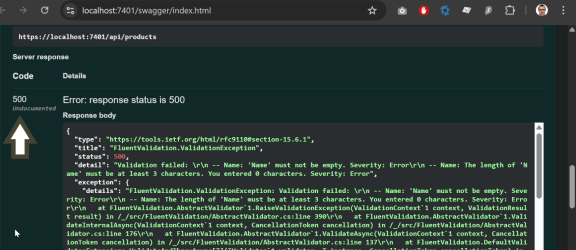
However, it returns a 500 Internal Server Error.
Adding an exception handler
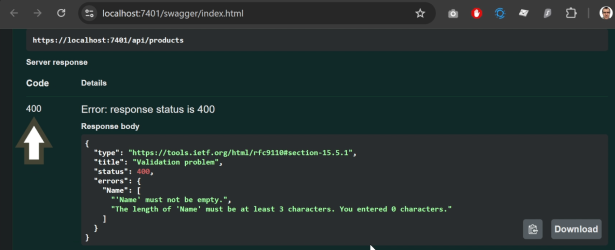
To resolve this, we add an exception handler. This checks the validation type thrown in ValidateAndThrowAsync and if it matches, it sets the response status code to 400 Bad Request and outputs a new ValidationProblemDetails instance, and lists all the validation problems.
// ValidationExceptionHandler.cs
public class ValidationExceptionHandler : IExceptionHandler
{
	public async ValueTask<bool> TryHandleAsync(
		HttpContext httpContext,
		Exception exception,
		CancellationToken cancellationToken)
	{
		if (exception is not ValidationException validationException)
		{
			return false;
		}

		httpContext.Response.StatusCode =
			StatusCodes.Status400BadRequest;

		await httpContext.Response.WriteAsJsonAsync(
			new ValidationProblemDetails(validationException
				.Errors
				.GroupBy(e => e.PropertyName)
				.ToDictionary(
					g => g.Key,
					g => g.Select(e => e.ErrorMessage).ToArray()))
			{
				Title = "Validation problem",
				Status = httpContext.Response.StatusCode,
				Type = "https://tools.ietf.org/html/rfc9110#section-15.5.1"
			},
			cancellationToken
		);

		return true;
	}
}
However, this will not work without registering it in builder.Services in Program.cs. We also need to call AddProblemDetails, and tell the web application to use the exception handler.
// Program.cs
builder.Services.AddExceptionHandler<ValidationExceptionHandler>();
builder.Services.AddProblemDetails();

var app = builder.Build();

app.UseExceptionHandler();
When a validation error occurs, a 400 Bad Request is thrown with details of the validation problems.
Generate a slug for the product
The next step is to move the slug generation into the Application project. We do that by creating a SlugHelper class and adding the slug generation into a method.
public static class SlugHelper
{
	public static string GenerateSlug(this string name)
	{
		if (string.IsNullOrWhiteSpace(name))
		{
			return name;
		}

		var slug = name.ToLower();
		slug = slug.Replace(" ", "-");
		slug = Regex.Replace(slug, "[^\\da-z\\-]+", "");

		return slug;
	}
}
We can then call it from ProductsService.AddAsync().
// ProductsService.cs
public class ProductsService : IProductsService
{
	private readonly IValidator<AddProductDto> _addProductDtoValidator;

	public ProductsService(
		IValidator<AddProductDto> addProductDtoValidator,
	{
		_addProductDtoValidator = addProductDtoValidator;
	}

	public async Task AddAsync(AddProductDto addProduct)
	{
		await _addProductDtoValidator.ValidateAndThrowAsync(
			addProduct);

		var slug = SlugHelper.GenerateSlug(addProduct.Name);
	}
}
Introducing Infrastructure
So far, we have only used the API and Application projects. But we are now going to use the Infrastructure project to create the Product record in the database.
To do this, we will create a new repository class, inject the DbContext and then write the method to insert the product into the database.
// ProductsRepository.cs
public class ProductsRepository : IProductsRepository
{
	private readonly CleanArchitectureDbContext _context;

	public ProductsRepository(CleanArchitectureDbContext context)
	{
		_context = context;
	}

	public async Task AddAsync(AddProductDto addProduct, string slug)
	{
		var product = new Product
		{
			Name = addProduct.Name,
			Price = addProduct.Price,
			Slug = slug,
			Created = DateTime.UtcNow
		};

		await _context.Products.AddAsync(product);
		await _context.SaveChangesAsync();
	}
}
After registering it in builder.Services, we will inject the repository into ProductsService, and we'll call ProductsRepository.AddAsync() from ProductsService.AddAsync().
// ProductsService.cs
public class ProductsService : IProductsService
{
	private readonly IValidator<AddProductDto> _addProductDtoValidator;
	private readonly IProductsRepository _productsRepository;

	public ProductsService(
		IValidator<AddProductDto> addProductDtoValidator,
		IProductsRepository productsRepository)
	{
		_addProductDtoValidator = addProductDtoValidator;
		_productsRepository = productsRepository;
	}

	public async Task AddAsync(AddProductDto addProduct)
	{
		await _addProductDtoValidator.ValidateAndThrowAsync(
			addProduct);

		var slug = SlugHelper.GenerateSlug(addProduct.Name);

		await _productsRepository.AddAsync(addProduct, slug);
	}
}
Our refactor is complete. You can watch this video to see what happens when we run this endpoint.
Latest tutorials

