
How to migrate from controllers to Minimal APIs

Controllers are old news! Minimal APIs are now the recommended approach in .NET. We will show you the reasons why you should move away from controllers, and how to migrate from a controller to Minimal APIs step-by-step.
Why move away from controllers?
There are many reasons to move away from controllers.
Too much boilerplate code
For a controller, there is too much boilerplate code even for simple APIs. You need the [ApiController] attribute, it's recommended to have a parent [Route]. Then you need to inherit ControllerBase. There are many examples where services are injected into the constructor. Then you need to set up an endpoint with a method and add another attribute for routing.
// ProductsController.cs
[Route("api/v{v:apiVersion}/products")]
[ApiVersion(1)]
[ApiController]
public class ProductsController : ControllerBase
{
	private readonly IProductsService _productsService;
	public ProductsController(IProductsService productsService)
	{
		_productsService = productsService;
	}

	[HttpGet("{id:int}")]
	[ProducesResponseType<GetProductDto>(StatusCodes.Status200OK)]
	[ProducesResponseType(StatusCodes.Status404NotFound)]
	public async Task<ActionResult<GetProductDto>> GetAsync(int id)
	{
		var product = await _productsService.GetAsync(id);

		if (product == null)
		{
			return NotFound();
		}

		return Ok(product);
	}
	...
}
More framework overhead
When you call builder.Services.AddControllers() in Program.cs, it adds nearly 100 additional services to your application. This will add to memory overhead despite the fact that you might not be using all the services.
Minimal APIs is now the recommended approach
Microsoft now recommends Minimal APIs for new applications. With this in mind, we really ought to think about migrating from controllers to Minimal APIs.
Migrating to Minimal APIs
Before we migrate to Minimal APIs, we need a plan:
API versioning
It is recommended to add API versioning as bugs could be introduced when migrating from controllers to Minimal APIs. This is important if clients are still using the controller endpoints.
For this, we are going to use V1 for controllers and V2 for the Minimal API endpoints.
You will need to have Swagger installed and then add the following NuGet packages:
Then we will call builder.Services.OpenApi and add the V1 and V2 parameter to each one. When the application is built, we can loop through each version and add it to the SwaggerEndpoint.
// Program.cs
var builder = WebApplication.CreateBuilder(args);

// Add an extra AddOpenApi extension method for each of them.
builder.Services.AddOpenApi("v1");
builder.Services.AddOpenApi("v2");

builder.Services.AddControllers();

builder.Services.AddApiVersions();

var app = builder.Build();

...

// Configure the HTTP request pipeline.
if (app.Environment.IsDevelopment())
{
	app.MapOpenApi();
	app.UseSwaggerUI(options =>
	{
		foreach (var version in app.DescribeApiVersions())
		{
			options.SwaggerEndpoint($"/openapi/{version.GroupName}.json",
				version.GroupName);
		}
	});
}

...

app.Run();
// ConfigureServices.cs
public static class ConfigureServices
{
extension(IServiceCollection services)
{
public IServiceCollection AddApiVersions()
{
services.AddApiVersioning(options =>
{
options.DefaultApiVersion = new ApiVersion(1);
options.ReportApiVersions = true;
options.AssumeDefaultVersionWhenUnspecified = true;
options.ApiVersionReader = ApiVersionReader.Combine(
new UrlSegmentApiVersionReader(),
new HeaderApiVersionReader("X-Api-Version"));
})
.AddMvc()
.AddApiExplorer(options =>
{
options.GroupNameFormat = "'v'V";
options.SubstituteApiVersionInUrl = true;
});
return services;
}
}
}We also need to include the ApiVersion attribute in the controller and mark it as API version 1.
// ProductsController.cs
[Route("api/v{v:apiVersion}/products")]
[ApiVersion(1)]
[ApiController]
public class ProductsController : ControllerBase
{
	...
}
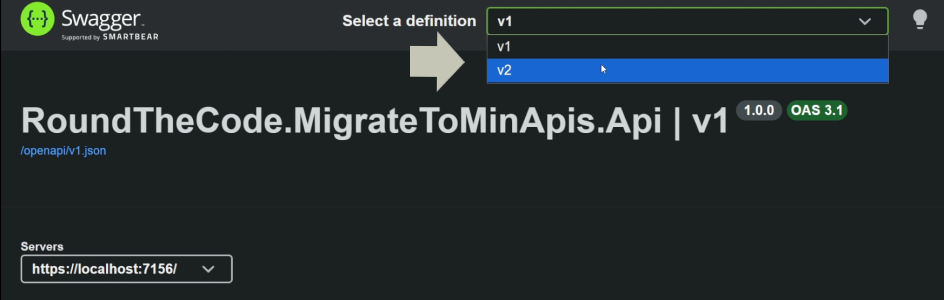
This will split the Swagger documentation with a V1 and V2 in the definition dropdown.
How to structure the API endpoints
What is frustrating is that Microsoft's documentation shows Minimal API endpoints added to Program.cs. This is a problem if you have a large number of API endpoints. You don't want to cram all your endpoints into Program.cs. In addition, they use lambda statements or expressions which are difficult to unit test.
What we'll do is register and put the endpoints in a separate ProductsEndpoints.cs file and then call an extension member in Program.cs to register the endpoints.
// Program.cs
var builder = WebApplication.CreateBuilder(args);

...

var app = builder.Build();

...

app.MapProductsEndpoints();

...

app.Run();
// ProductsEndpoints.cs
public static class ProductsEndpoints
{
extension(WebApplication app)
{
public WebApplication MapProductsEndpoints()
{
return app;
}
}
}Adding API versioning
We want to add API versioning to the Minimal API endpoints. It's important that we mark it as V2 as controllers are using V1. This is done by creating an API version set.
// ProductsEndpoints.cs
public static class ProductsEndpoints
{
	extension(WebApplication app)
	{
		public WebApplication MapProductsEndpoints()
		{
			var apiVersionSet = app.NewApiVersionSet()
				.HasApiVersion(new ApiVersion(2))
				.ReportApiVersions()
				.Build();

			return app;
		}
	}
}
Adding a group
One of the great things about Minimal APIs is that you can group similar endpoints together. We can create a group, then add the API versioning to it. We have also tagged it with Products.
// ProductsEndpoints.cs
public static class ProductsEndpoints
{
	extension(WebApplication app)
	{
		public WebApplication MapProductsEndpoints()
		{
			var apiVersionSet = app.NewApiVersionSet()
				.HasApiVersion(new ApiVersion(2))
				.ReportApiVersions()
				.Build();

			 var group = app.MapGroup("api/v{version:apiVersion}/products")
				 .WithApiVersionSet(apiVersionSet)
				 .WithTags("Products");

			return app;
		}
	}
}
We are now ready to migrate the controller endpoints to Minimal APIs.
If you want to go further and build a Minimal API project from scratch, we also have an online course that has great feedback from developers who have taken it. There are free preview lessons too, so you can see exactly what is included.
Add the endpoints
We can then use the group to map the endpoints. We use either MapGet, MapPost, MapPut or MapDelete, adding the route. Instead of using a lambda statement or expression, we add the endpoint handler into a static method. This makes it much easier to unit test.
// ProductsEndpoints.cs
public static class ProductsEndpoints
{
	extension(WebApplication app)
	{
		public WebApplication MapProductsEndpoints()
		{
			var apiVersionSet = app.NewApiVersionSet()
				.HasApiVersion(new ApiVersion(2))
				.ReportApiVersions()
				.Build();

			var group = app.MapGroup("api/v{version:apiVersion}/products")
				.WithApiVersionSet(apiVersionSet)
				.WithTags("Products")
				.ProducesProblem(StatusCodes.Status500InternalServerError);

			group.MapGet("{id:int}", GetAsync);
			group.MapPost("/", CreateAsync)
				.ProducesValidationProblem();
			group.MapPut("{id:int}", UpdateAsync);
			group.MapDelete("{id:int}", DeleteAsync);

			return app;
		}
	}

	public static async Task<Results<Ok<GetProductDto>, NotFound>> GetAsync(
		int id,
		IProductsService productsService)
	{
		var product = await productsService.GetAsync(id);

		if (product == null)
		{
			return TypedResults.NotFound();
		}

		return TypedResults.Ok(product);
	}

	public static async Task<Results<Created, BadRequest>> CreateAsync(
		CreateProductDto createProduct,
		IProductsService productsService)
	{
		if (!await productsService.CreateAsync(createProduct))
		{
			return TypedResults.BadRequest();
		}

		return TypedResults.Created();
	}

	public static async Task<Results<NoContent, BadRequest>> UpdateAsync(
		 int id,
		 UpdateProductDto updateProduct,
		 IProductsService productsService)
	{
		if (!await productsService.UpdateAsync(id, updateProduct))
		{
			return TypedResults.BadRequest();
		}

		return TypedResults.NoContent();
	}

	public static async Task<Results<NoContent, BadRequest>> DeleteAsync(
		int id,
		IProductsService productsService)
	{
		if (!await productsService.DeleteAsync(id))
		{
			return TypedResults.BadRequest();
		}

		return TypedResults.NoContent();
	}
}
The final result
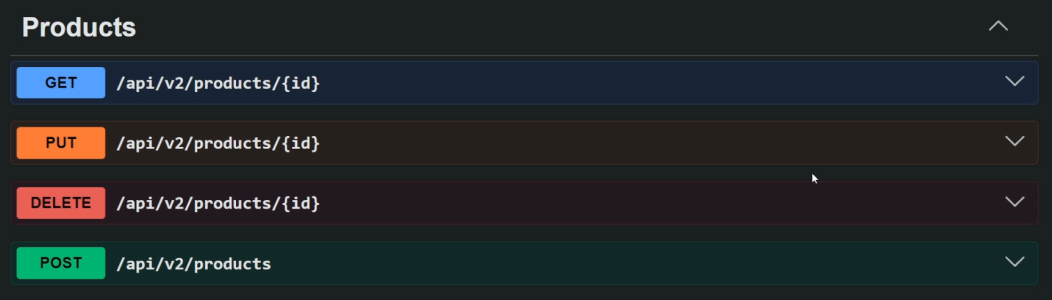
In the V2 definition of the Swagger documentation, we now have the Minimal API endpoints.
Watch the video
Watch this video where we show you why you should no longer use controllers and how to migrate existing controller endpoints to Minimal APIs.
Related pages

