
5 Minimal API myths and the real truth

We are going to look at five common Minimal API myths and debunk them.
Myth 1: Force all logic into Program.cs
There is a misconception that all logic needs to go into Program.cs. It is no great surprise that developers think this, given that Microsoft's documentation usually shows Minimal APIs using the WebApplication instance directly in Program.cs.
// Program.cs
var app = builder.Build();

var apiVersionSet = app.NewApiVersionSet()
	.HasApiVersion(new ApiVersion(1))
	.ReportApiVersions()
	.Build();

app.MapGet("/api/v{version:apiVersion}/products/{id:int}",
	(int id) =>
		new GetProductDto(id))
	.WithApiVersionSet(apiVersionSet);

app.MapPost("/api/v{version:apiVersion}/products",
	(CreateProductDto createProduct) =>
		TypedResults.Created(
			string.Empty,
			new CreatedProductDto(createProduct.Name)))
	.WithApiVersionSet(apiVersionSet);

app.MapPut("/api/v{version:apiVersion}/products/{id:int}",
	(int id, UpdateProductDto updateProduct) =>
		new UpdatedProductDto(id, updateProduct.Name))
	.WithApiVersionSet(apiVersionSet);

app.MapDelete("/api/v{version:apiVersion}/products/{id:int}",
	(int id) =>
		new DeletedProductDto(id))
	.WithApiVersionSet(apiVersionSet);
However, there is no reason why these endpoints cannot be moved to another class.
In this example, we move them to a ProductsEndpoints class inside a new method. The method takes a WebApplication instance and contains all the logic for the Minimal APIs.
// ProductsEndpoints.cs
public static class ProductsEndpoints
{
	public static WebApplication MapProductsEndpoints(this WebApplication app)
	{
		var apiVersionSet = app.NewApiVersionSet()
			.HasApiVersion(new ApiVersion(1))
			.ReportApiVersions()
			.Build();

		app.MapGet("/api/v{version:apiVersion}/products/{id:int}",
			(int id) =>
				new GetProductDto(id))
			.WithApiVersionSet(apiVersionSet);

		app.MapPost("/api/v{version:apiVersion}/products",
			(CreateProductDto createProduct) =>
				TypedResults.Created(
					string.Empty,
					new CreatedProductDto(createProduct.Name)))
			.WithApiVersionSet(apiVersionSet);

		app.MapPut("/api/v{version:apiVersion}/products/{id:int}",
			(int id, UpdateProductDto updateProduct) =>
				new UpdatedProductDto(id, updateProduct.Name))
			.WithApiVersionSet(apiVersionSet);

		app.MapDelete("/api/v{version:apiVersion}/products/{id:int}",
			(int id) =>
				new DeletedProductDto(id))
			.WithApiVersionSet(apiVersionSet);

		return app;
	}
}
We then call app.MapProductsEndpoints() from Program.cs to register the endpoints.
// Program.cs
app.MapProductsEndpoints();
This is how we structure the code in our Minimal API for Complete Beginners course. In addition, we cover other topics mentioned in this article, including unit testing, essential features, and setting up OpenAPI/Swagger documentation.
Moving the endpoints into groups
What do all of the above Minimal API endpoints have in common? They are all prefixed with /api/v{version:apiVersion}/products.
Therefore, we can move them into a group by calling app.MapGroup and adding the prefixed URL. As each endpoint also uses WithApiVersionSet, we can apply that to the group as well.
As a result, each endpoint is called from the group, the prefixed URL is removed from individual endpoints, and WithApiVersionSet is no longer required on each one.
// ProductsEndpoints.cs
public static class ProductsEndpoints
{
	public static WebApplication MapProductsEndpoints(this WebApplication app)
	{
		var apiVersionSet = app.NewApiVersionSet()
			.HasApiVersion(new ApiVersion(1))
			.ReportApiVersions()
			.Build();

		var productsGroup = app.MapGroup(
			"/api/v{version:apiVersion}/products")
			.WithApiVersionSet(apiVersionSet);

		productsGroup.MapGet("/{id:int}",
			(int id) =>
				new GetProductDto(id));

		productsGroup.MapPost("/",
			(CreateProductDto createProduct) =>
				TypedResults.Created(
					string.Empty,
					new CreatedProductDto(createProduct.Name)));

		productsGroup.MapPut("/{id:int}",
			(int id, UpdateProductDto updateProduct) =>
				new UpdatedProductDto(id, updateProduct.Name));

		productsGroup.MapDelete("/{id:int}",
			(int id) =>
				new DeletedProductDto(id));

		return app;
	}
}
Built-in functionality like controllers
It would be beneficial if Microsoft introduced something similar to controllers for Minimal APIs in future .NET updates. Without them, developers have a "free-for-all" when deciding how to structure their code.
With controllers, you typically place them in a Controllers folder, each section has its own class that inherits from ControllerBase, and each endpoint has its own method.
// ProductsController.cs
[ApiVersion(2)]
[ApiController]
[Route("api/v{version:apiVersion}/products")]
public class ProductsController : ControllerBase
{
	[HttpGet("{id:int}")]
	public GetProductDto Get(int id)
	{
		return new GetProductDto(id);
	}

	[HttpPost]
	public CreatedResult Create(CreateProductDto createProduct)
	{
		return Created(string.Empty, new CreatedProductDto(createProduct.Name));
	}

	[HttpPut("{id:int}")]
	public UpdatedProductDto Update(int id, UpdateProductDto updateProduct)
	{
		return new UpdatedProductDto(id, updateProduct.Name);
	}

	[HttpDelete("{id:int}")]
	public DeletedProductDto Delete(int id)
	{
		return new DeletedProductDto(id);
	}
}
Myth 2: Difficult to unit test
Most examples of Minimal APIs contain logic inside lambda expressions or statements. However, you can move that logic into separate methods.
In this example, the MapGet endpoint logic has been moved into a Get method.
// ProductsEndpoints.cs
public static class ProductsEndpoints
{
	public static WebApplication MapProductsEndpoints(this WebApplication app)
	{
		var apiVersionSet = app.NewApiVersionSet()
			.HasApiVersion(new ApiVersion(1))
			.ReportApiVersions()
			.Build();

		var productsGroup = app.MapGroup(
			"/api/v{version:apiVersion}/products")
			.WithApiVersionSet(apiVersionSet);

		productsGroup.MapGet("/{id:int}", Get);

		...

		return app;
	}

	public static GetProductDto Get(int id)
	{
		return new GetProductDto(id);
	}
}
As a result, you can unit test individual methods in a similar way to controller actions. Below is an xUnit test for the Get method, ensuring the correct return type and value.
// ProductsTests.cs
public class ProductsTests
{
	[Fact]
	public void Get_WhenCalled_ReturnsExpectedResult()
	{
		var id = 9;
		var act = ProductsEndpoints.Get(id);

		Assert.Equivalent(act, new GetProductDto(id));
	}
}
This is no different from unit testing a controller method.
Myth 3: Lacks essential features
We have already covered that route groups, API versioning and unit testing are fully supported in Minimal APIs.
Authorisation
You can add authorisation by calling RequireAuthorization.
In this example, we create an authentication handler and register it in Program.cs. It uses an API request header key, where the value must be abc to authenticate successfully.
// ApiKeyAuthenticationHandler.cs
public class ApiKeyAuthenticationHandler :
    AuthenticationHandler<AuthenticationSchemeOptions>
{
	public const string SchemeName = "ApiKey";

	public ApiKeyAuthenticationHandler(
		IOptionsMonitor<AuthenticationSchemeOptions> options,
		ILoggerFactory loggerFactory,
		UrlEncoder urlEncoder
		) : base(options, loggerFactory, urlEncoder)
	{
	}

	protected override Task<AuthenticateResult> HandleAuthenticateAsync()
	{
		if (!Request.Headers.TryGetValue("api-key",
			out var apiKeyHeaderValue))
		{
			return Task.FromResult(AuthenticateResult.Fail(
				"The API key is missing from the request header")
			);
		}

		if (apiKeyHeaderValue != "abc")
		{
			return Task.FromResult(AuthenticateResult.Fail(
				"The API key in the request header does not match the config")
			);
		}

		var identity = new ClaimsIdentity(
			new[] { new Claim(ClaimTypes.Name, SchemeName) },
			SchemeName
		);

		return Task.FromResult(AuthenticateResult.Success(
			new AuthenticationTicket(
				new ClaimsPrincipal(identity),
				SchemeName
			)));
	}
}
// Program.cs
builder.Services.AddAuthorization(options =>
{
options.AddPolicy("ApiKeyPolicy", policy =>
{
policy.AddAuthenticationSchemes(
ApiKeyAuthenticationHandler.SchemeName);
policy.RequireAuthenticatedUser();
});
});
builder.Services.AddAuthentication()
.AddScheme<AuthenticationSchemeOptions,
ApiKeyAuthenticationHandler>(
ApiKeyAuthenticationHandler.SchemeName,
null
);You can then apply RequireAuthorization to the group or to individual endpoints.
// ProductsEndpoints.cs
var productsGroup = app.MapGroup(
	"/api/v{version:apiVersion}/products")
	.WithApiVersionSet(apiVersionSet)
	.RequireAuthorization();
Validation
Validation is also supported as part of the .NET 10 update using data annotations. Here, the Name property is marked as required.
// CreateProductDto.cs
public class CreateProductDto
{
	[Required]
	public string Name { get; set; } = string.Empty;
}
You must register validation in Program.cs by calling AddValidation.
// Program.cs
builder.Services.AddValidation();
Whenever the POST endpoint in productsGroup is called, createProduct.Name must have a value; otherwise, a 400 Bad Request response is returned automatically.
Myth 4: OpenAPI documentation is complex to set up
Another myth is that OpenAPI documentation is complex to configure. In reality, it is straightforward.
If your endpoint logic returns specific response types, you can define them using Results.
In this example, the endpoint can either return NotFound, or Ok with a GetProductDto instance:
// ProductsEndpoints.cs
public static Results<Ok<GetProductDto>, NotFound> Get(int id)
{
	var a = 1;

	if (a != 1)
	{
		return TypedResults.NotFound();
	}

	return TypedResults.Ok(new GetProductDto(id));
}
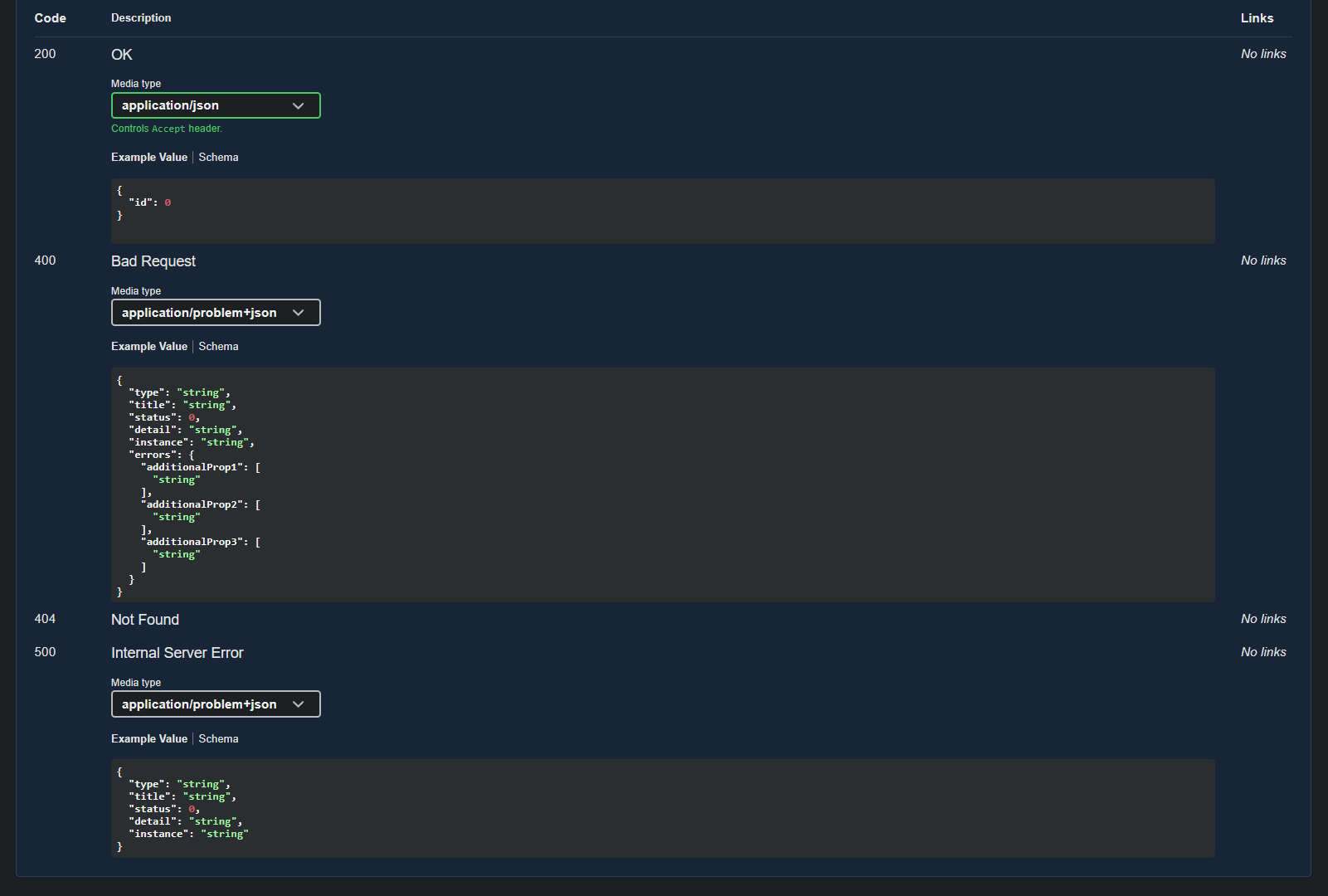
This automatically adds 200 and 404 responses to the OpenAPI documentation.
If a response type is not explicitly returned, you can use ProducesValidationProblem or ProducesProblem when registering a group or an endpoint.
// ProductsEndpoints.cs
productsGroup.MapPost("/",
	(CreateProductDto createProduct) =>
		TypedResults.Created(
			string.Empty,
			new CreatedProductDto(createProduct.Name)))
	.ProducesValidationProblem()
	.ProducesProblem(StatusCodes.Status500InternalServerError);
This adds 400 Bad Request and 500 Internal Server Error to the documented responses.
Myth 5: Only suitable for small projects
There is a misconception that "minimal" means small. In reality, minimal means lightweight.
There is no reason why you cannot have 300 to 400 endpoints in a Minimal API application. In such cases, structuring the code as demonstrated in this article is essential.
For example, if you wanted to add category endpoints, you would place them in a separate class and register them from Program.cs.
Watch the video
Watch the video where we go through and debunk each of the myths covered in this article.
Recommended for new API projects
Microsoft now recommends using Minimal APIs for new projects. As a result, you can expect to see more Minimal API applications in the coming years.
It is essential to learn how to use them effectively. You can do so by viewing our Minimal API for Complete Beginners course, which also covers clean architecture, Entity Framework Core with SQL Server, dependency injection, logging, authentication, and unit testing.
Related articles
