
We built an AI tool for .NET/C# developers in 2 days

If you find that AI overengineers .NET code, you're not alone - it is one of the most common complaints from .NET developers, according to this LinkedIn poll. So, we fixed it. We built an AI tool specifically for .NET and C# developers in just 2 days. We will show you the prompts we gave Claude to build it, what the tool does, and how you can use it right now to get better answers to your .NET and C# questions.
Vague questions
One of the most important things you can do to get the best response is to give as much detail as possible. Judging by some of the questions you have given to this AI tool so far, they are quite vague. Here are some examples:
How do you add authentication? - If you give it this prompt, it is not going to know what type of authentication you want to add. JWT? Basic? It will make an assumption or ask you follow-up questions.
How to execute a stored procedure - This does not give any context as to what ORM you are using. Entity Framework? Dapper? The LLM must therefore make an assumption, or ask you follow-up questions.
How do I make pasta? - Pasta is PASTA architecture, but the AI tool did not know that. It probably assumed that you were asking about the food that originates from Italy.
The solution
We built an AI tool for .NET and C# developers which integrates with Claude's API. To give you the best possible answers, we ask you for the .NET version you are using, any related packages, and your question.
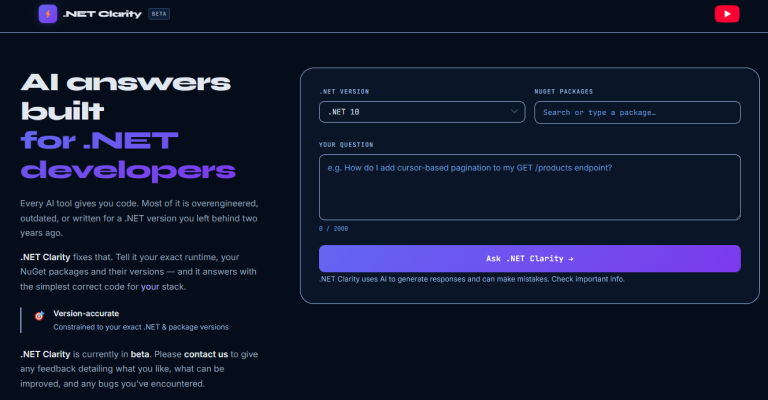
We then give Claude's API a system prompt that feeds in the answers from the form. It also ensures that the answers to your questions are kept on topic, gives you the simplest answer, and does not introduce additional packages unless you specifically ask for it.
The LLM we chose
We chose Claude to build and integrate with this AI tool. One of the reasons is that we believe it gives solid coding solutions to you, the developer. One of its features is Claude Code - an AI-powered coding assistant that you can integrate with your application. It helps you build features, fix bugs, and automate development tasks. Although we did not use Claude Code for this project, having this tool means Claude integrates with C# code on a regular basis. We therefore felt that it would be better at giving you more accurate answers to your .NET questions.
The prompt
Here is a summary of the prompt we gave it to build the AI tool. We explained that developers are often too vague in their questions, referenced poll results showing that overengineering simple code was the biggest pain point (63% on LinkedIn, 74% on YouTube), and outlined exactly what we wanted to build:
A form where a .NET/C# developer can input their request, targeting ASP.NET Core developers only
Integration with Claude's API to return a response
Form fields for the .NET version, related packages and versions, and the question itself
A system prompt designed to prevent overengineering and return the simplest possible answer
A .NET 10 / C# 14 backend using Minimal API endpoints, structured like this:
// Program.cs
app.MapProductsEndpoints();
// ProductsEndpoints.cs
public static class ProductsEndpoints
{
extension (WebApplication app)
{
public WebApplication MapProductsEndpoints()
{
var group = app.MapGroup("/api/products");
group.MapGet("/", GetAllAsync);
return app;
}
}
public static async Task<IList<GetProductDto>> GetAllAsync(
IProductService productService) =>
await productService.GetAllProductsAsync();
}We also asked for clean architecture across API, Application, and Infrastructure projects, with the Application project handling services, DTOs, and validators, and the Infrastructure project using Entity Framework Core with repositories.
The result
Notice the amount of detail that went into that prompt. We gave it a backstory, described how we wanted the form to look for you, and we even asked it to use clean architecture, Minimal APIs, and endpoints in a separate file. If you can give AI this sort of detail, you will get a much better response.
It gave us answers to some of our key questions.
Is it possible to integrate with Claude's API?
Yes. Anthropic's API is purpose-built for exactly this. You POST a system prompt and a user message and get a response. Your .NET 10 backend calls it via HttpClient. No SDK is needed, though there is an official one if you prefer.
Pricing
Claude Sonnet 4 is priced at $3 per million input tokens and $15 per million output tokens. A well-structured prompt for a code question is roughly 500–800 input tokens, and a good code response is around 500–1,500 output tokens. That works out at roughly $0.003–$0.025 per request - essentially free at any reasonable scale.
Overengineering simple code
This is 100% a system prompt problem. The key techniques are:
Explicitly forbid patterns — tell Claude not to use the Mediator pattern, Repository pattern, or Abstract Factory unless the user explicitly asks.
Set a complexity budget — instruct it to default to the simplest solution that solves the stated problem.
Ask the developer for scope — questions such as "Is this for production or learning?" and "How many developers will maintain this?" signal appropriate complexity.
Add a simplicity check instruction — prompt it to ask itself whether the solution could be done in fewer lines without sacrificing readability before responding.
The system prompt
The trick to reducing cost is a tight system prompt that does not repeat itself, with the user's context collected once upfront rather than repeated in each message. Here is the architecture:
// System Prompt - set once, ~400 tokens
You are a senior .NET/C# assistant specialising in ASP.NET Core Minimal APIs.
Constraints:
- Target: .NET {version}, C# {version}
- Packages in use: {package list}
- Architecture: {chosen style}
- ALWAYS prefer the simplest solution
- NEVER add abstraction layers unless explicitly asked
- NEVER use patterns (MediatR, Repository, CQRS) unless the user requests them
- Use Minimal API syntax, not controllers
- Return only code and a brief explanation — no preamble
// User message - per request, ~100-300 tokens
{their actual question}Prototype
It generated a prototype for us that looked like this.
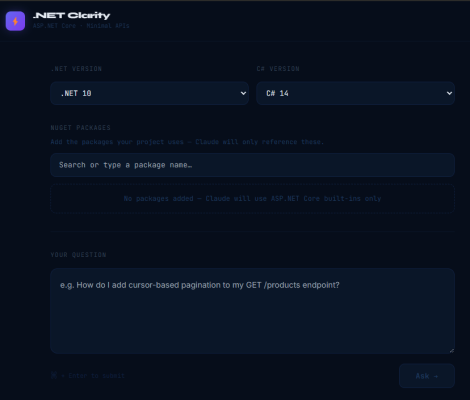
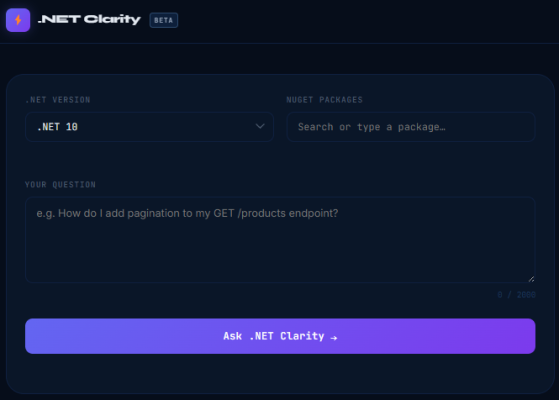
We felt it was a bit over the top to ask you for the C# version. Most of you would be using the same C# version that comes with your .NET version. So we asked it to remove that field.
Creating the ASP.NET Core AI tool
At this point, we were happy with the prototype and wanted to create the ASP.NET Core app. We asked Claude to generate the code for a .NET 10 ASP.NET Core Web API. Here is the request DTO we specified:
DotNetVersion(string)Packages[]withNameandVersionQuestion
We again specified Minimal APIs with the same endpoint structure as before, clean architecture across API, Application, and Infrastructure layers, and asked for FluentValidation in the Application layer. We also asked whether it was possible to prevent vague, off-topic questions - such as "What is the time in New York?" - from ever reaching the LLM. For the Infrastructure layer, we wanted one repository class for database communication and another for the Claude NuGet package (or HttpClient if no package was available).
Again, notice the level of detail we gave it. If you are using AI to create an ASP.NET Core app, we recommend that you tell it exactly how you want it structured and how you want each layer to work.
After this, we asked it to build the front end. We asked it to add ControllersWithViews, using controllers to render Razor views if Minimal APIs could not do so. For the front end, we wanted a home page with a placeholder in the top-left-hand corner of the screen, marketing what the tool is and why it was built. The user would then be presented with the form to fill out, hit submit, and receive an answer streamed character by character, as AI tools typically do. The user can then add follow-up questions, and no login functionality for the prototype. We asked for CSS in SASS and JavaScript in TypeScript, with the page being responsive, mobile-friendly, and including front-end validation matching the backend FluentValidation rules.
It then generated the front-end code and integrated it into the ASP.NET Core app.
A couple of issues
When it built the code it generated, we ran into several compile issues which we asked it to fix. These included:
Unable to reference
Microsoft.Extensionsfrom a class library. It forgot to referenceMicrosoft.AspNetCore.Appfrom the .csproj file.Register a FluentValidation validator from a made up method. We had to manually register it as a scoped service.
Used the Anthropic.SDK NuGet package to integrate with the Claude API, but generated code targeting version 5 whilst referencing version 3 in the application. This is a problem some of you have raised - AI generating code for a version that does not match what is actually installed.
Getting extension members and methods confused. It tried to be clever and use C# 14's extension members, but used extension method syntax.
The form wasn't submitting. We added a prompt and pressed the submit button, but it was adding the form values to the querystring.
It is therefore essential that you test any code that AI outputs to ensure that it is working as it should.
The final result
Claude generated around 80% of the code used for the AI tool, which meant that we were able to launch it as a working prototype in as little as 2 days. Previously, this would have taken us a couple of weeks. Using AI significantly sped up the process, and it is something that you can use in your daily coding.
You can try out the AI tool today - let us know any feedback you have and what you think could be improved.
And check out the video below for more details on how we built this application where you can learn the exact prompts that we used to build this tool.
Related articles

