AutoMapper's last free version has a security flaw

AutoMapper's last free version has just been hit with a high-severity security vulnerability.
And if you're still using AutoMapper v14, your application could be affected.
Let's break down what happened and what it means for the free version.
The vulnerability
The vulnerability was posted as part of GitHub advisory GHSA-rvv3-g6hj-g44x and scored 7.5 out of 10, making it a high-severity vulnerability. It affects mapping objects that have a nested object of the same type. If you go down enough levels (approximately 25,000-30,000 levels), it can cause a StackOverflowException.
It has been patched, but only in the paid versions. From version 15 onwards, AutoMapper requires a paid licence if a company earns over a certain amount in gross revenue each year.
The summary of the attack from the advisory is as follows:
AutoMapper is vulnerable to a Denial of Service (DoS) attack. When mapping deeply nested object graphs, the library uses recursive method calls without enforcing a default maximum depth limit. This allows an attacker to provide a specially crafted object graph that exhausts the thread's stack memory, triggering a StackOverflowException and causing the entire application process to terminate.
This is critical, as a StackOverflowException is fatal for your application. It will crash the application and stop working.
Recreating the vulnerability
We tried recreating this vulnerability by creating a UserDto type that has a nested UserDto type.
// UserDto.cs
public class UserDto
{
	public string Name { get; set; } = string.Empty;

	public UserDto? RelatedUser { get; set; }
}
We would then map it to a UserMapperDto type with similar properties:
// UserMapperDto.cs
public class UserMapperDto
{
	public string Name { get; set; } = string.Empty;

	public UserMapperDto? RelatedUser { get; set; }
}
After that, we created the map profile in the Web API:
// Program.cs
builder.Services.AddAutoMapper(options =>
{
	options.CreateMap<UserDto, UserMapperDto>();
});
Finally, we set up an API endpoint that would accept a UserDto type and map it to a UserMapperDto type.
// Program.cs
app.MapPost("/api/users", (UserDto user, IMapper mapper) =>
{
	mapper.Map<UserMapperDto>(user);

	return TypedResults.NoContent();
});
The result
Rather than getting the StackOverflowException that was mentioned in the advisory, we got a 400 Bad Request.
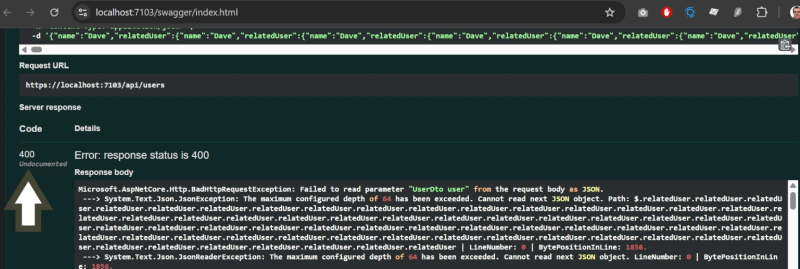
It turns out the JSON max depth is set to 64 levels, so that limit was hit before any code in the endpoint was executed, including the mapping to the UserMapperDto type.
We then increased the JSON max depth to 50,000 levels:
// Program.cs
builder.Services.ConfigureHttpJsonOptions(options =>
{
	options.SerializerOptions.MaxDepth = 50_000;
});
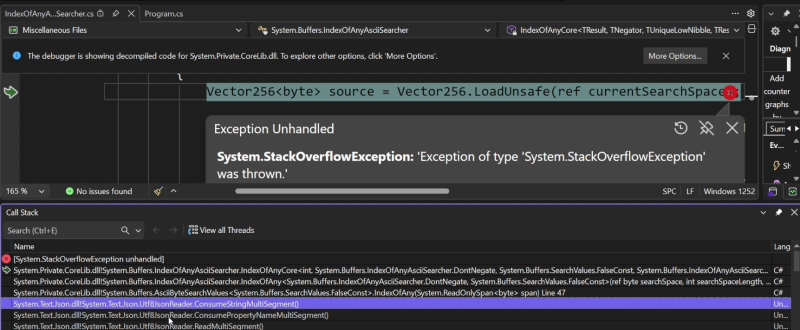
This resulted in a StackOverflowException: "Exception of type 'System.StackOverflowException' was thrown" exception. However, it did not occur during the mapping call. Looking at the call stack, it appears that the JSON max depth caused the StackOverflowException.
A new test
We scrapped that test and used the one from the advisory, changing the types that we created for the UserDto and UserMapperDto.
// Program.cs
app.MapPost("/api/users", (IMapper mapper) =>
{
	var root = new UserDto();
	var current = root;
	for (int i = 0; i < 30000; i++)
	{
		current.RelatedUser = new UserDto();
		current = current.RelatedUser;
	}

	mapper.Map<UserMapperDto>(root);
});
At this point, we got the StackOverflowException that we were expecting when running the endpoint.
The patches
There are a number of ways you can patch this vulnerability:
Update to the latest version
If you don't mind paying for a licence for AutoMapper, or you qualify for a free licence, then the simplest option is to update to the latest version of AutoMapper.
Fix in code for each mapper
However, if you do not want to pay for it, you can add a max depth to each of your mappers.
// Program.cs
builder.Services.AddAutoMapper(options =>
{
	options.CreateMap<UserDto, UserMapperDto>()
		.MaxDepth(64);
});
Fix for all mappers
If you have a number of mappers configured, this is going to take a long time. A much better approach is to retrieve all maps and set each one to a depth of 64 levels.
// Program.cs
builder.Services.AddAutoMapper(options =>
{
    options.Internal().ForAllMaps((_, mapExpr) =>
    {
        mapExpr.MaxDepth(64);
    });
});
Suppress the vulnerability
Despite these fixes, you will still get the vulnerability warning when building your application. You can go into the .csproj file and add a NoWarn tag to the package reference.
<PackageReference Include="AutoMapper" Version="[14.0.0,15.0.0)">
	<NoWarn>NU1903;GHSA-rvv3-g6hj-g44x</NoWarn>
</PackageReference>
NU1903 represents that it is a high-severity vulnerability, and GHSA-rvv3-g6hj-g44x is the ID of the GitHub advisory. If you have enabled the NuGet audit, you can also suppress the advisory like this:
<NuGetAuditSuppress Include="https://github.com/advisories/GHSA-rvv3-g6hj-g44x" />This will apply at the project level. However, if you have multiple projects, you can add a Directory.Build.props file to the root of your solution and include the following:
<Project>
	<PropertyGroup>
		<NoWarn>NU1903;GHSA-rvv3-g6hj-g44x</NoWarn>
	</PropertyGroup>

	<ItemGroup>
		<NuGetAuditSuppress Include="https://github.com/advisories/GHSA-rvv3-g6hj-g44x" />
	</ItemGroup>
</Project>
Replace it with MagicMapper
Despite these fixes, you may still get warnings, particularly in your CI pipelines. Instead of using AutoMapper, you can replace it with MagicMapper. MagicMapper is a fork of version 14 of AutoMapper, which is the last free version. The good news is that the vulnerability has already been patched, so using it will make your application secure.
Use cases for this vulnerability
The developer in charge of AutoMapper has outlined a number of use cases where this could occur:
Database-driven tree structures. (think comment threads with parents, product catalog trees, employment hierarchies). An attacker can create individual items which wouldn't trigger any overflow, then trigger a stack overflow on a page that shows the full hierarchy
Deserializers without depth limits. STJ and Newtonsoft.JSON do enforce a depth limit when used with say, model binding. Many other deserializers do not (protobuf, BSON, etc)
File upload processing. It's also not an uncommon use case to map XML or YAML with AutoMapper. A deeply nested structure would trigger the stack overflow
Externally-sourced data. An app calls an API that returns a compromised, deeply nested structure, and that API model is then mapped into AutoMapper.
We know that JSON's max depth limit applies in a Web API call. However, as the developer notes, there are a number of other deserialisers that do not enforce this, so that is where the vulnerability is most likely to occur.
For the other points, an attacker would need to gain access to your infrastructure to perform these attacks. As a result, you would likely have more serious issues than a circular dependency problem with AutoMapper. This raises the question of whether the high severity score is justified.
Watch the video
Watch the video where we guide you through the vulnerability, show you how we recreated it, and explain what you can do to patch it.
Going forward
If you are starting a new .NET application, we strongly recommend avoiding AutoMapper. One of its biggest drawbacks is that mapping issues only surface at runtime, making them harder to detect and more costly to fix. Modern development practices favour catching these problems during the build process.
If you want to see what a modern, production-ready approach looks like, check out our Minimal APIs for complete beginners course. You will build a real-world .NET application from start to finish - from project setup through to fully implemented API endpoints, with logging and unit testing included.
Minimal APIs are now Microsoft's recommended approach for building Web APIs. If you want to stay competitive as a .NET developer and build applications the right way, now is the time to make the shift.
Latest articles