Are exceptions exposing vulnerabilities in your .NET App?

If an exception is thrown in your .NET application, you might be exposing sensitive information that an attacker can exploit.
In this article, we'll look at where this happens, why it's dangerous, and how to fix it properly-using both Host.CreateDefaultBuilder and the current WebApplication.CreateBuilder approach.
An example using older ASP.NET Core templates
ASP.NET Core apps that were created before .NET 6 were typically set up to use the now-obsolete WebHost.CreateDefaultBuilder. In this scenario, it's recommended to use Host.CreateDefaultBuilder. Here's a typical example:
// Program.cs
public class Program
{
	public static void Main(string[] args)
	{
		CreateHostBuilder(args).Build().Run();
	}

	public static IHostBuilder CreateHostBuilder(string[] args) =>
		Host.CreateDefaultBuilder(args)
			.ConfigureWebHostDefaults(builder =>
			{
				builder.ConfigureServices(services =>
				{
					services.AddControllers();
					services.AddEndpointsApiExplorer();
				});

				builder.Configure(app =>
				{
					var env = app.ApplicationServices
						.GetRequiredService<IHostEnvironment>();

					app.UseHttpsRedirection();
					app.UseAuthorization();

					app.UseRouting();
					app.UseEndpoints(endpoints =>
					{
						endpoints.MapControllers();
					});
				});
			});
}
Regardless of which environment you are running your app in, no detailed error page is returned when an exception is thrown.
This is good because no sensitive information is exposed. However, it's also bad because you might want some detail to be returned in the response.
Adding the developer exception page
Let's add the developer exception page:
// Program.cs
builder.Configure(app =>
{
	...

	app.UseDeveloperExceptionPage();

	...
});
What happens now? Regardless of which environment you are running in, the developer exception page is shown:
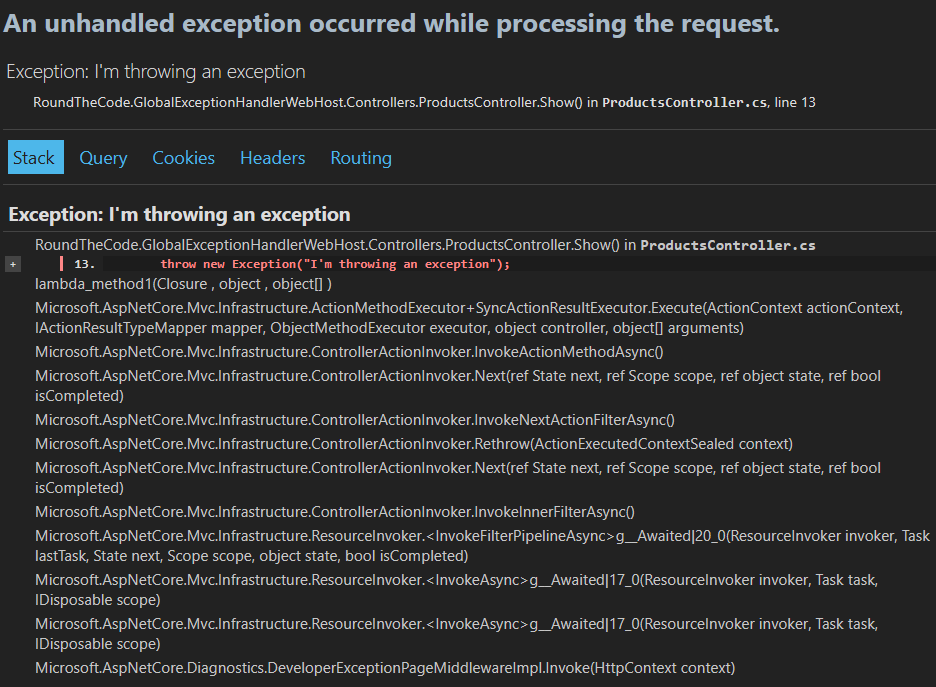
That means this page would also be shown in Production if an exception is thrown.
This is a serious problem.
The developer exception page exposes:
- Full stack traces
- Query string values
- Cookies
- Headers
- Routing data
This information can be extremely valuable to an attacker.
The fix: only enable it in Development
The solution is simple but critical-only enable the developer exception page when running locally.
// Program.cs
builder.Configure(app =>
{
	var env = app.ApplicationServices
		.GetRequiredService<IHostEnvironment>();

	...

	if (env.IsDevelopment())
	{
		app.UseDeveloperExceptionPage();
	}

	...
});
With this change, the developer exception page is only shown when running in Development. If the environment is set to Staging or Production, no exception details will be exposed.
An example using current templates
If you used a modern template to create your ASP.NET Core app, the app.UseDeveloperExceptionPage() call becomes redundant.
Modern templates use WebApplication.CreateBuilder, and here's a typical example:
// Program.cs
var builder = WebApplication.CreateBuilder(args);

// Add services to the container.
builder.Services.AddControllers();
builder.Services.AddOpenApi();

var app = builder.Build();

// Configure the HTTP request pipeline.
if (app.Environment.IsDevelopment())
{
	app.MapOpenApi();
}

app.UseHttpsRedirection();
app.UseAuthorization();
app.MapControllers();

app.Run();
The developer exception page is enabled by default, but only when running in the Development environment. Therefore, you don't need to include app.UseDeveloperExceptionPage().
If you’re running in any other environment, no exception details will be exposed.
So, as long as your environment is set up correctly in Production (for example, it’s not set to Development), your app is secure.
Global exception handling
In Production, hiding exception details is good-but returning nothing isn't ideal for users or clients.
A better approach is to use a global exception handler.
This lets you:
- Return a consistent error response
- Avoid leaking sensitive information
- Still provide useful feedback to clients
Here's an example exception handler:
// GlobalExceptionHandler.cs
public class GlobalExceptionHandler : IExceptionHandler
{
	public async ValueTask<bool> TryHandleAsync(
		HttpContext httpContext,
		Exception exception,
		CancellationToken cancellationToken)
	{
		httpContext.Response.StatusCode =
			StatusCodes.Status500InternalServerError;

		httpContext.Response.ContentType =
			"application/problem+json";

		await httpContext.Response.WriteAsJsonAsync(
			new ProblemDetails
			{
				Title = "An unhandled error occurred",
				Type = exception.GetType().Name,
				Status = httpContext.Response.StatusCode,
				Detail = exception.Message
			});

		return true;
    }
}
Returning true ensures the exception has been handled and the pipeline will stop.
Global exception handling is covered in our Minimal API for complete beginners course. You'll also learn how to build a real application that incorporates clean architecture, Entity Framework Core with SQL Server, dependency injection, logging, authentication, and unit testing.
Registering the global exception handler
If you're using WebApplication.CreateBuilder, here's how to register it.
// Program.cs
var builder = WebApplication.CreateBuilder(args);

...

builder.Services.AddExceptionHandler<GlobalExceptionHandler>();
builder.Services.AddProblemDetails();

var app = builder.Build();

app.UseExceptionHandler();

...

app.Run();
If you use Host.CreateDefaultBuilder, here's how to register it:
// Program.cs
builder.ConfigureServices(services =>
{
    ...

    services.AddExceptionHandler<GlobalExceptionHandler>();
    services.AddProblemDetails();
});

builder.Configure(app =>
{
    ...

    app.UseExceptionHandler();

    ...
});
Here’s an example response when an exception is thrown (in all environments):
{
	"type":"Exception",
	"title":"An unhandled error occurred",
	"status":500,
	"detail":"I'm throwing an exception"
}
You can also use the environment to only enable this handler in Staging or Production, depending on your needs.
Watch the video
You can watch the video to see how exceptions behave in different environments:
Final thoughts
Unhandled exceptions can expose far more information than you might expect-and attackers know exactly where to look.
To stay safe:
Never enable
UseDeveloperExceptionPage()globallyAlways scope
UseDeveloperExceptionPage()to DevelopmentDon't use
UseDeveloperExceptionPage()at all withWebApplication.CreateBuilderConsider using a global exception handler instead to output useful information about the exception to the user or client
Latest articles