
What's new in .NET 9? Key features you need to know!

.NET 9 comes with new features such as new LINQ methods, a change to API documentation and a brand new caching library. Here are the key features that you need to know:
New LINQ methods
.NET 9 introduces new LINQ methods which include:
CountBy
This method groups elements, counts the number of occurrences and returns them as key-value pairs. It's useful for counting the number of records in a column, which previously required more complex LINQ queries.
In this example, we are going through each customer surname and count the number of customers that have that surname.
// LinqCountBy.cs
public record Customer(string Forename, string Surname);

public class LinqCountBy
{
	List<Customer> customers =
	[
		new("Donald", "Trump"),
		new("Joe", "Biden"),
		new("Judd", "Trump")
	];

	public Dictionary<string, int> GetCountForEachSurname()
	{
		var surnameCount = new Dictionary<string, int>();

		foreach (var s in customers.CountBy(p => p.Surname))
		{
			surnameCount.Add(s.Key, s.Value);
		}

		return surnameCount;
	}
}
By invoking the GetCountForEachSurname method, it would return:
Trump = 2
Biden = 1
AggregateBy
This is similar to the CountBy method but instead of counting the results, it applies an aggregate function like sum or average.
To demonstrate this, we have populated some of the results in the Premier League this season and calculated the number of points for each team:
// LinqAggregateBy.cs
public record PremierLeagueResults(string Team, ResultEnum Result, string OpposingTeam);

public enum ResultEnum
{
    Win,
    Lose,
    Draw
}

public class LinqAggregateBy
{
    List<PremierLeagueResults> premierLeagueResults =
    [
        new("Brighton", ResultEnum.Win, "Man Utd"),
        new("Man Utd", ResultEnum.Lose, "Brighton"),
        new("Brighton", ResultEnum.Win, "Tottenham"),
        new("Tottenham", ResultEnum.Lose, "Brighton"),
        new("Brighton", ResultEnum.Win, "Man City"),
        new("Man City", ResultEnum.Lose, "Brighton"),
        new("Man Utd", ResultEnum.Lose, "Tottenham"),
        new("Tottenham", ResultEnum.Win, "Man Utd")
    ];

    public Dictionary<string, int> GetPoints()
    {
        var premierLeagueTeamPoints = new Dictionary<string, int>();

        foreach (var s in premierLeagueResults
            .AggregateBy(p =>
                p.Team,
                seed => 0,
				(seed, pls) => seed +
				(pls.Result == ResultEnum.Win ? 3 :
				(pls.Result == ResultEnum.Draw ? 1 : 0))
                ).OrderByDescending(t => t.Value)
            )
        {
            premierLeagueTeamPoints.Add(s.Key, s.Value);
        }

        return premierLeagueTeamPoints;
    }
}
Running the GetPoints method would return the following result:
Brighton = 9
Tottenham = 3
Man Utd = 0
Man City = 0
Index
The Index method allows you to get the index of an IEnumerable.
By calling this method, it returns the index and the instance that belongs to it:
// LinqIndex.cs
public record Product(string Name);

public class LinqIndex
{
	List<Product> products =
	[
		new("Watch"),
		new("Ring"),
		new("Necklace")
	];

	public Dictionary<string, int> GetIndexForEachProduct()
	{
		var productIndex = new Dictionary<string, int>();

		foreach (var (index, product) in products.Index())
		{
			productIndex.Add(product.Name, index);
		}

		return productIndex;
	}
}
Invoking the GetIndexForEachProduct method returns the following:
Watch = 0
Ring = 1
Necklace = 2
Minimal API updates
Minimal APIs have seen a couple of updates that focus on testing improvements and endpoint documentation.
Added InternalServerError to TypedResults
Returning the TypedResults static class is useful as it returns a strongly typed object for Minimal API responses. This makes it better for unit testing. The alternative is to use the Results static class which returns an IResult instance.
.NET 9 sees TypedResults factory methods added for the HTTP 500 Internal Server Error response. Here is an example of how you can use it:
// Program.cs
var builder = WebApplication.CreateBuilder(args);

var app = builder.Build();

app.MapGet("/server-error", () => TypedResults.InternalServerError("It's broken."));

app.Run();
ProducesProblem and ProducesValidationProblem added to route groups
If you use the MapGroup extension method to group your routes together, then you'll be able to take advantage of the new ProducesProblem and ProducesValidationProblem extension methods.
This specifies that any endpoints within this group could either return a validation issue or a server error and is added to the OpenAPI metadata.
In the following example, OpenAPI metadata is added to any endpoint in the /product group. If a validation problem occurs, a HTTP 400 Bad Request response is returned. Whereas, a HTTP 500 Internal Server Error response is returned if there is a server error.
var builder = WebApplication.CreateBuilder(args);

var app = builder.Build();

var product = app.MapGroup("/product")
    .ProducesProblem((int)HttpStatusCode.InternalServerError)
    .ProducesValidationProblem((int)HttpStatusCode.BadRequest);

product.MapGet("/", () => true);

app.Run();
Developer exception page improvements
The developer exception page can be shown with the development environment when an unhandled exception is thrown.
This is how you would set it up in the Program.cs file in an ASP.NET Core app:
// Program.cs
var builder = WebApplication.CreateBuilder(args);

...

var app = builder.Build();

...

// Configure the HTTP request pipeline.
if (app.Environment.IsDevelopment())
{
    app.UseDeveloperExceptionPage(); // <-- Add this line
}

...

app.Run();
.NET 9 sees improvements to the Routing tab. The Endpoint Metadata section has been added.
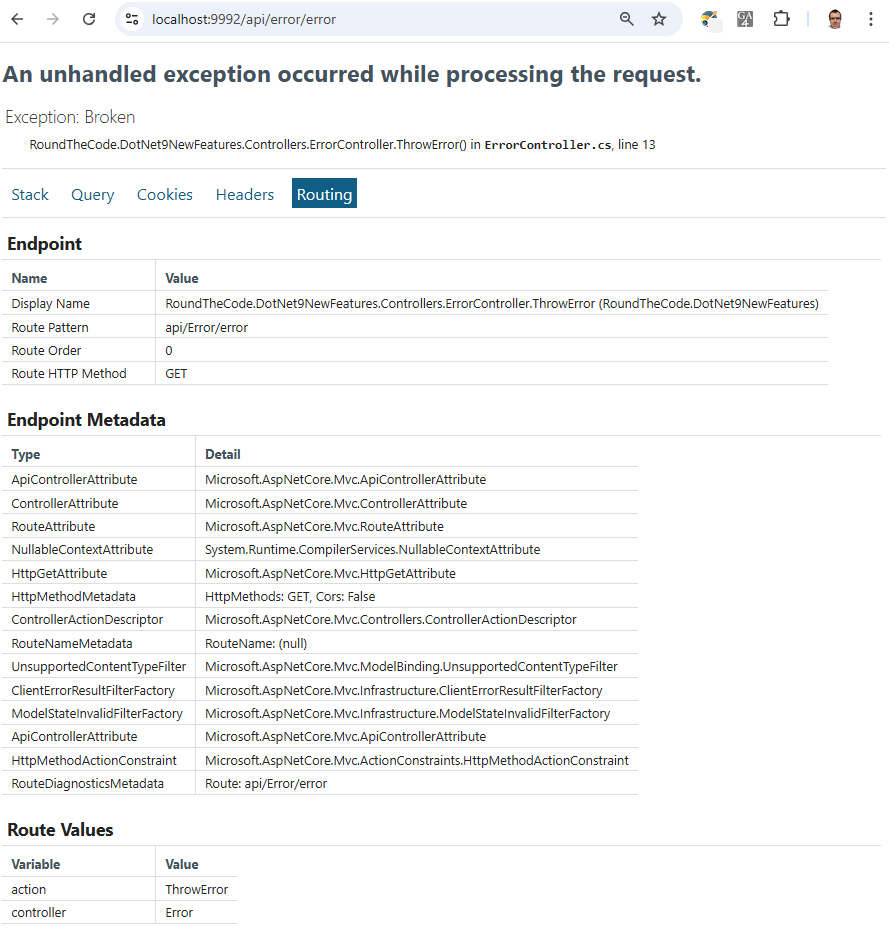
Just remember to only use the development exception page in the development environment. You do not want to expose key information about your application in production which would be gold for a potential hacker.
Middleware now supports keyed services injection
.NET 8 saw the keyed services feature that allows you to have multiple implementations of the same service.
However, this was not supported with middleware. You were unable to resolve a keyed service dependency when adding it to the constructor, or the Invoke or InvokeAsync method in the middleware.
But support has been added in .NET 9. The constructor is able to support singleton and transient lifetimes. The Invoke and InvokeAsync methods can also support these alongside scoped lifetimes.
// IMyService.cs
public interface IMyService
{
}
// MySingletonService.cs
public class MySingletonService : IMyService
{
}// MyScopedService.cs
public class MyScopedService : IMyService
{
}// MyMiddleware.cs
public class MyMiddleware
{
private readonly RequestDelegate _next;
private readonly IMyService _mySingletonService;
public MyMiddleware(
RequestDelegate next,
[FromKeyedServices("singleton")] IMyService mySingletonService
)
{
_next = next;
_mySingletonService = mySingletonService;
}
public Task Invoke(HttpContext context,
[FromKeyedServices("scoped")] IMyService myScopedService)
=> _next(context);
}// Program.cs
var builder = WebApplication.CreateBuilder(args);
...
builder.Services.AddKeyedSingleton<IMyService, MySingletonService>("singleton"); // <-- Singleton keyed service
builder.Services.AddKeyedScoped<IMyService, MyScopedService>("scoped"); // <-- Scoped keyed service
var app = builder.Build();
...
app.UseMiddleware<MyMiddleware>(); // <!-- Use MyMiddleware
...
app.Run();Static asset delivery optimisation
.NET 9 sees static file optimisation in ASP.NET Core.
There is build time compression for static assets that live in the wwwroot folder. Gzip compression is added to these files in development with the addition of Brotli compression when publishing.
To support this, you replace the UseStaticFiles method with MapStaticAssets when using the WebApplication instance in Program.cs.
// Program.cs
var builder = WebApplication.CreateBuilder();

var app = builder.Build();

...

app.UseStaticFiles(); // Remove this line
app.MapStaticAssets(); // Add this line instead

...

app.Run();
Always adds compression when publishing files
We have found a bug in 9.0.0 where it adds the Gzip and Brotli compression when publishing, regardless of whether you use UseStaticFiles or MapStaticAssets.
This can present a problem if you have a large number of static assets and the only way we've been able to turn it off is to add <StaticWebAssetsEnabled>false</StaticWebAssetsEnabled> to the .csproj file.
This solution worked for us, but it's not for everyone. Turning this off disables Razor class libraries and can also cause issues with CSS isolation.
OpenAPI document generation support
There is built-in support for generating OpenAPI documents with ASP.NET Core in .NET 9.
The first thing you need to do is to install the Microsoft.AspNetCore.OpenApi NuGet package to your ASP.NET Core application.
From there you can add the following configuration to the Program.cs file in your ASP.NET Core application:
// Program.cs
var builder = WebApplication.CreateBuilder();

builder.Services.AddOpenApi(); // <- Add this line

var app = builder.Build();

if (app.Environment.IsDevelopment())
{
	app.MapOpenApi(); // <- Add this line
}

...

app.Run();
Assuming you have either controller-based or Minimal API endpoints set up, you can run the application and go to /openapi/v1.json to view your OpenAPI document.
If you wish to change this endpoint, you can supply the new endpoint as a parameter in the MapOpenApi method.
// Program.cs
var builder = WebApplication.CreateBuilder();

builder.Services.AddOpenApi();

var app = builder.Build();

if (app.Environment.IsDevelopment())
{
	app.MapOpenApi("myapidocument.json"); // <- Add this line
}

...

app.Run();
No more Swagger documentation support
OpenAPI documentation has replaced Swagger in the Web API template from .NET 9 onwards. That means that when you create an ASP.NET Core app in .NET 9, you'll only be able to select OpenAPI configuration.
Microsoft have made the decision to drop Swashbuckle support. They claim that the "the project is no longer actively maintained by its community owner" and that "issues have not been addressed or resolved".
You can still use Swagger in your .NET 9 projects, but you'll need to configure it for yourself.
New HybridCache library
A new caching library has been added to bridge the gaps between the existing IDistributedCache and IMemoryCache libraries.
HybridCache is designed as a drop-in replacement and supports both in-process and out-of-process caching.
Adding it to your ASP.NET Core project
At the time of .NET 9's full release, HybridCache is in preview but will be released in a future minor release of .NET Extensions. However you can still use it in your .NET 9 projects.
First, you need to add the Microsoft.Extensions.Caching.Hybrid NuGet package to your application. Afterwards, you'll need to configure it in the Program.cs class in your ASP.NET Core application:
// Program.cs
var builder = WebApplication.CreateBuilder(args);

...

builder.Services.AddHybridCache(); // <- Add this line

...

var app = builder.Build();

...

app.Run();
If you're using the preview version, you'll get the following compile exception:
'Microsoft.Extensions.DependencyInjection.HybridCacheServiceExtensions.AddHybridCache(Microsoft.Extensions.DependencyInjection.IServiceCollection)' is for evaluation purposes only and is subject to change or removal in future updates. Suppress this diagnostic to proceed.
To resolve that, you'll need to suppress the EXTEXP0018 exception by adding these lines:
// Program.cs
var builder = WebApplication.CreateBuilder(args);

...

#pragma warning disable EXTEXP0018 // <- Add this line
builder.Services.AddHybridCache();
#pragma warning restore EXTEXP0018 // <- Add this line


...

var app = builder.Build();

...

app.Run();
Get or create your cache
You can inject the HybridCache instance through dependency injection by passing in the HybridCache type as a parameter in your constructor.
The HybridCache type has a GetOrCreateAsync method. This allows you to set a key for it and the function to return when it is setting the cache. You can also set entry options such as the LocalCacheExpiration and the Expiration:
// IHttpService.cs
public interface IHttpService
{
	Task<string> ReadAsync();
}
// HttpService.cs
public class HttpService : IHttpService
{
	private readonly IHttpClientFactory _httpClientFactory;

	public HttpService(IHttpClientFactory httpClientFactory)
	{
		_httpClientFactory = httpClientFactory;
	}

	public async Task<string> ReadAsync()
	{
		using var httpClient = _httpClientFactory.CreateClient("DummyJSON");

		var response = await httpClient.GetAsync($"/products/1");

		if (!(response?.IsSuccessStatusCode ?? false))
		{
			return string.Empty;
		}

		return await response.Content.ReadAsStringAsync();
	}
}
// Program.cs
var builder = WebApplication.CreateBuilder(args);
...
builder.Services.AddScoped<IHttpService, HttpService>(); // <-- Add HttpService to DI
builder.Services.AddHttpClient("DummyJSON", (httpClient) => { // <-- Add HttpClient
httpClient.BaseAddress = new Uri("https://dummyjson.com");
});
...
var app = builder.Build();
...
app.Run();// CacheController.cs
[Route("api/[controller]")]
[ApiController]
public class CacheController : ControllerBase
{
private readonly HybridCache _hybridCache;
private readonly IHttpService _httpService;
public CacheController(
HybridCache hybridCache,
IHttpService httpService)
{
_hybridCache = hybridCache;
_httpService = httpService;
}
[HttpGet]
public async Task<string> MyCache()
{
return await _hybridCache.GetOrCreateAsync("product", async (cancellationToken) =>
{
return await _httpService.ReadAsync();
}, new HybridCacheEntryOptions
{
LocalCacheExpiration = TimeSpan.FromMinutes(1),
Expiration = TimeSpan.FromMinutes(1)
});
}
}The HybridCache type also has methods for SetAsync where you just set the cache but don't return a result. It also has RemoveAsync where you remove a cache record by specifying a key.
Support for Redis
HybridCache also has support for Redis. This is great if you have multiple instances of your web application as you can cache can be stored in a centralised location.
You'll need to add your Redis connection string to the appsettings.json file, add the Microsoft.Extensions.Caching.StackExchangeRedis NuGet package to your project and then add the following to your Program.cs file:
var builder = WebApplication.CreateBuilder(args);

...

builder.Services.AddStackExchangeRedisCache(options =>
{
    options.Configuration =
        builder.Configuration.GetConnectionString("Redis");
}); // <!-- Add this

var app = builder.Build();

...

app.Run();
In this instance, the Redis connection string is called from the ConnectionString:Redis configuration section in appsettings.json.
{
  "Logging": {
    "LogLevel": {
      "Default": "Information",
      "Microsoft.AspNetCore": "Warning"
    }
  },
  "ConnectionStrings": {
    "Redis": "localhost"
  }
}
To get Redis on your machine, Windows users can install WSL onto your machine and then install Ubuntu. There is a handy guide on how to add Redis through WSL on their website.
Once you have Redis installed, you can test it's working by seeing if the method in the GetOrCreateAsync method is called on multiple restarts on your application. If it isn't, there is a very high chance that the cache is being called from Redis.
See the new features in action
Watch our video where we go through each of the new features so you can see how they work.
You can also download the code example to try the new features yourself.
Should you update to .NET 9?
.NET 9 has some great new features but is that a good enough reason to update? As .NET 9 only offers standard term support, its 18 months support will expire six months before .NET 8.
Read more about how you update to .NET 9, and find out whether you should update your application to .NET 9 or stick with your current .NET version.
Related pages

