
.NET 9 has been released and this is how you update

.NET 9 has been released and you might be thinking about updating your ASP.NET Core application.
We'll go through what you need to update your application. From updating Visual Studio and downloading the .NET SDK to finding out about any breaking changes that might break your application.
Downloading the .NET 9 SDK
These are the steps you need to download the .NET 9 SDK.
Updating Visual Studio
If you're a Windows user and you use Visual Studio 2022, you'll need to update it to version 17.12 or above. To do that, you can go to Help and Check for Updates. If there are any updates, it will prompt you to download and install them.
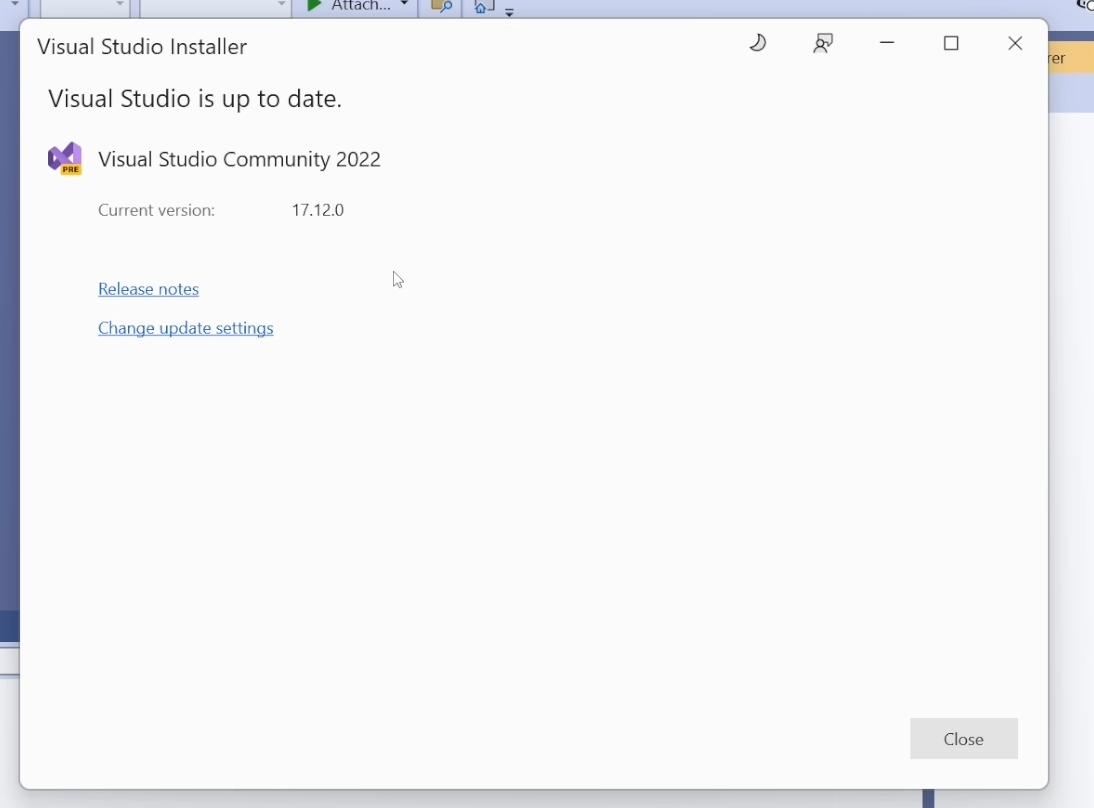
Updating Visual Studio should automatically install the .NET 9 SDK so there shouldn't be any further steps.
Linux and Mac users
If you are on Linux or a Mac user or you don't use Visual Studio, you'll need to download the .NET 9 SDK from the Microsoft website.
The SDK is available on Windows, Linux and macOS. Select the appropriate download for your operating system.
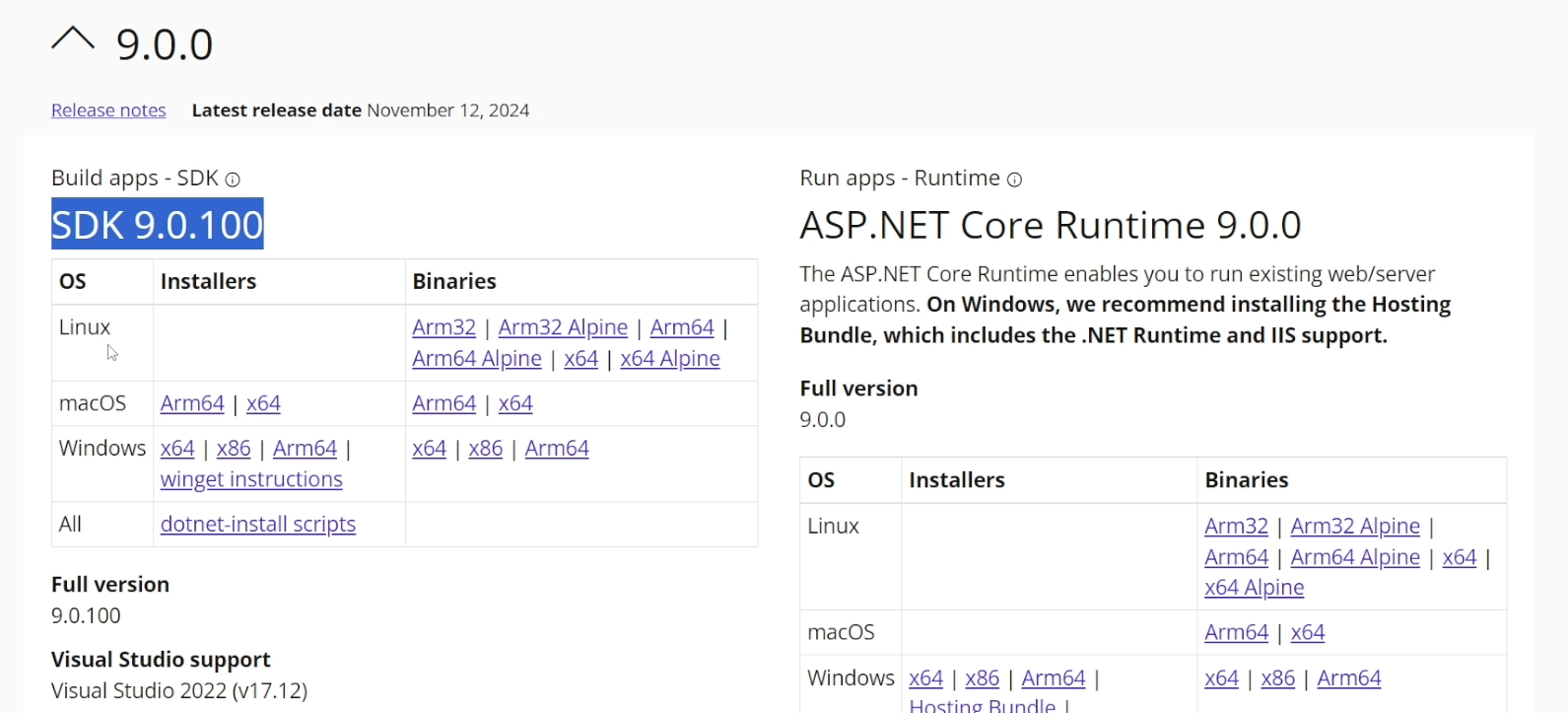
Just remember to download the SDK and not the Runtime. The Runtime is installed on the web server where your application is running.
Check that the .NET 9 SDK has been installed
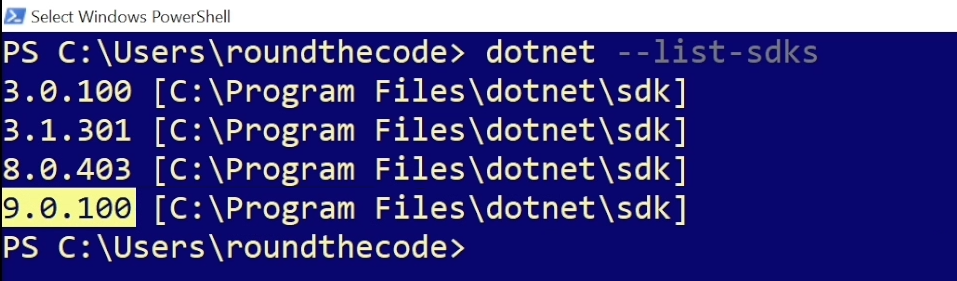
At this point, it's a good idea to check that the .NET 9 SDK has been successfully installed on your machine.
In a PowerShell window, you can type the following command line:
dotnet --list-sdksIf there is a version that begins with 9, then the .NET 9 SDK has successfully been installed. This means we can update our application.
Updating your application to .NET 9
Updating your application to .NET 9 is a simple step.
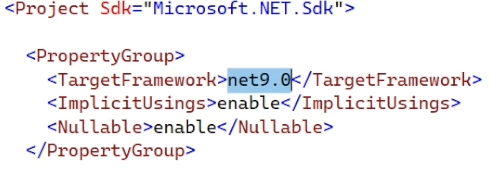
In your project, open up the .csproj file and update the TargetFramework attribute to net9.0. You'll need to do that for any projects that are referenced to your ASP.NET Core application.
In-addition, you'll need to update any Microsoft NuGet packages that are running on version 8 if you're using .NET 8, or whatever version corresponds with the .NET version you are using. For example, if you are using the Microsoft.EntityFrameworkCore NuGet package, you'll need to update it to version 9.
If you're a Visual Studio user, the best way of doing that is by going to Tools, Packages and Manage NuGet Packages for Solution. This will give you a list of all the NuGet packages that need updating.
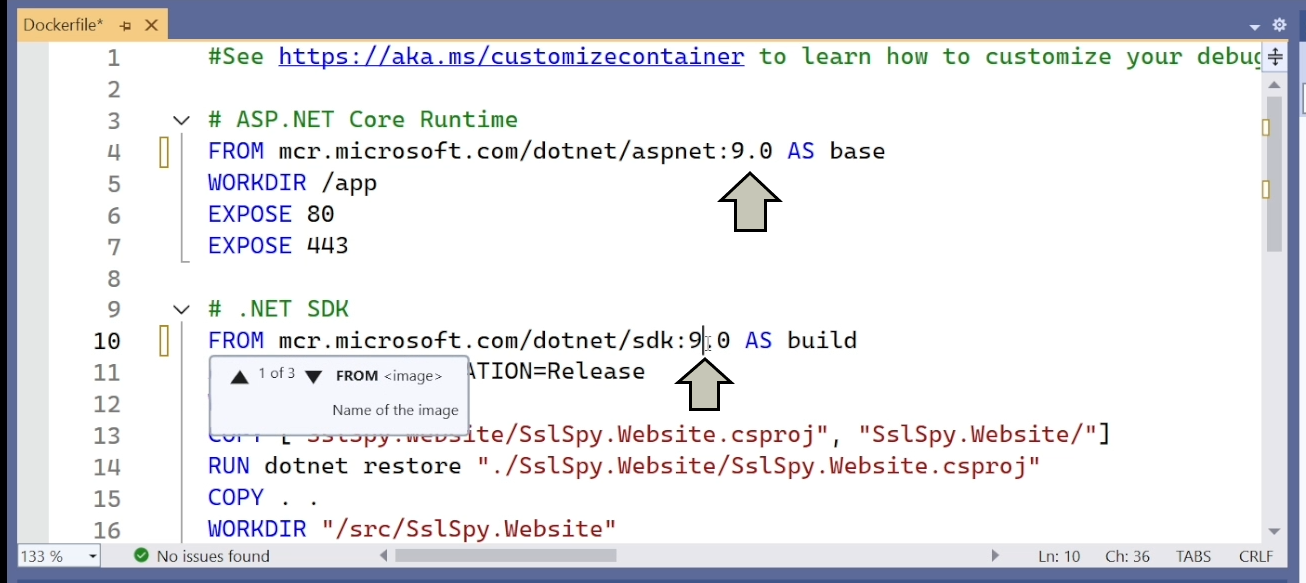
If you use Docker, you'll need to update the Dockerfile and change the SDK and Runtime versions to 9.0.
Breaking changes
Hopefully you'll application will build and run successfully. But if it doesn't, the likelyhood is that your application has some breaking changes that need resolving.
Microsoft has a list of all the .NET 9 breaking changes. Let's highlight some of the key ones in .NET 9.
FromKeyedServicesAttribute no longer injects non-keyed parameter
If you are using keyed services that were introduced in .NET 8, there is a change to how they are resolved in dependency injection.
In .NET 8, if you injected a keyed service that wasn't registered as part of dependency injection but you had a non-keyed service that had the same interface, the non-keyed service would be resolved.
In this example, if we didn't register vipCustomerService as a keyed service but we registered ICustomerService as a non-keyed service, the non-keyed service would get resolved instead.
public CustomerService([FromKeyedServices("vipCustomerService")] ICustomerService vipCustomerService ...) { }But in .NET 9, the behaviour has changed where an InvalidOperationException will always be thrown if we try to resolve a keyed service that hasn't been registered.
HttpClientFactory logging redacts header values by default
The HttpClientFactory default logging includes Trace level logs that output all the request and response headers.
By including the RedactLoggedHeaders method, you can specify which ones are sensitive and are redacted from the logs.
services.AddHttpClient("MyEngine", ...)
    .RedactLoggedHeaders(h => h.StartsWith("X-"));
In .NET 8, if you didn't include the RedactLoggedHeaders method then the log values would be kept as they are.
But starting with .NET 9, if you don't include the RedactLoggedHeaders method, all the log values will be redacted by default. It's only when you specify the RedactLoggedHeaders method that the headers not included in them are kept as they are.
Support for empty environment variables
Support was added to be able to set an environment variable to the empty string using Environment.SetEnvironmentVariable with a key and value parameter.
In .NET 8, if you use the SetEnvironmentVariable and specify the value parameter as either string.Empty or null, it deleted the environment variable. If you used ProcessStartInfo.Environment to set a value of an environment variable to either string.Empty or null, it would set it to an empty value.
But the behaviour has changed in .NET 9. Setting the value in Environment.SetEnvironmentVariable to string.Empty will set it as an empty value. Setting it to null will delete the environment variable. If you use ProcessStartInfo.Environment to set a value of a variable to string.Empty, it will set it to an empty value. Setting it to null will delete the environment variable.
Should you update to .NET 9?
If your application is using .NET 7 or anything below .NET 6 then you should update as these versions reached end of life sometime ago. This means that they are no longer supported by Microsoft.
And on the same day that .NET 9 was released, .NET 6 reached end of life meaning it's also no longer supported by Microsoft. But why should you update?
New features
You can take advantage of some of the new features that are included in later .NET versions.
In .NET 9, there is support for OpenAPI and also new LINQ expressions such as the CountBy expression. In this example, the CountBy expression is used to list out all the number of customers for each surname.
public record Customer(string Forename, string Surname);

public class MyClass
{
	List<Customer> customers =
	[
		new("Donald", "Trump"),
		new("Joe", "Biden"),
		new("Judd", "Trump")
	];

	public Dictionary<string, int> GetCountForEachSurname()
	{
		var surnameCount = new Dictionary<string, int>();

		foreach (var s in customers.CountBy(p => p.Surname))
		{
			surnameCount.Add(s.Key, s.Value);
		}

		return surnameCount;
	}
}
By updating to .NET 9, you can also take advantage of the new features in .NET 8 such as keyed services and the new global handling exception middleware.
Security updates
You can also take advantage of security updates that are available in newer .NET versions. Microsoft often release updates that focus around denial-of-service vulnerabilities that help prevent DDoS attacks. DDoS attacks can flood your application with bogus traffic making your application very slow or even inaccessible to your real users so it's something you should take seriously.
Long term support (LTS) or short term support (STS)?
At the time that this article was published, .NET 8 and .NET 9 were the two .NET versions that are supported by Microsoft.
.NET 8 was released in November 2023 but has three years support meaning it's supported until November 2026. Despite .NET 9 being released a year later, it only has 18 months of support meaning that it will reach end of life six months before .NET 8.
| Version | Release date | End of life date | Support length |
|---|---|---|---|
| .NET 8 (LTS) | 14th November 2023 | 10th November 2026 | 3 years |
| .NET 9 (STS) | 12th November 2024 | 12th May 2026 | 18 months |
So it really depends on your circumstances whether you update to .NET 8 or .NET 9. If you have a large project that requires a lot of time to update and test, you're probably worth sticking with the long term support that .NET 8 gives. However, if you have a smaller project that doesn't take long to update, feel free to upgrade to .NET 9 and take advantage of the new features that are on offer.
Deploying your application
If you use Azure YAML CI/CD pipelines, you may need to download the .NET 9 SDK onto your Azure agent. This is particularly important if .NET 9 has just been released as the Azure agent may not have the .NET 9 SDK installed.
You can do that by including this task in your YAML pipeline:
- task: UseDotNet@2
  name: 'UseDotNet9SDK'
  displayName: '.NET 9 SDK install'
  inputs:
    packageType: sdk
    version: 9.x
    installationPath: $(Agent.ToolsDirectory)/dotnet
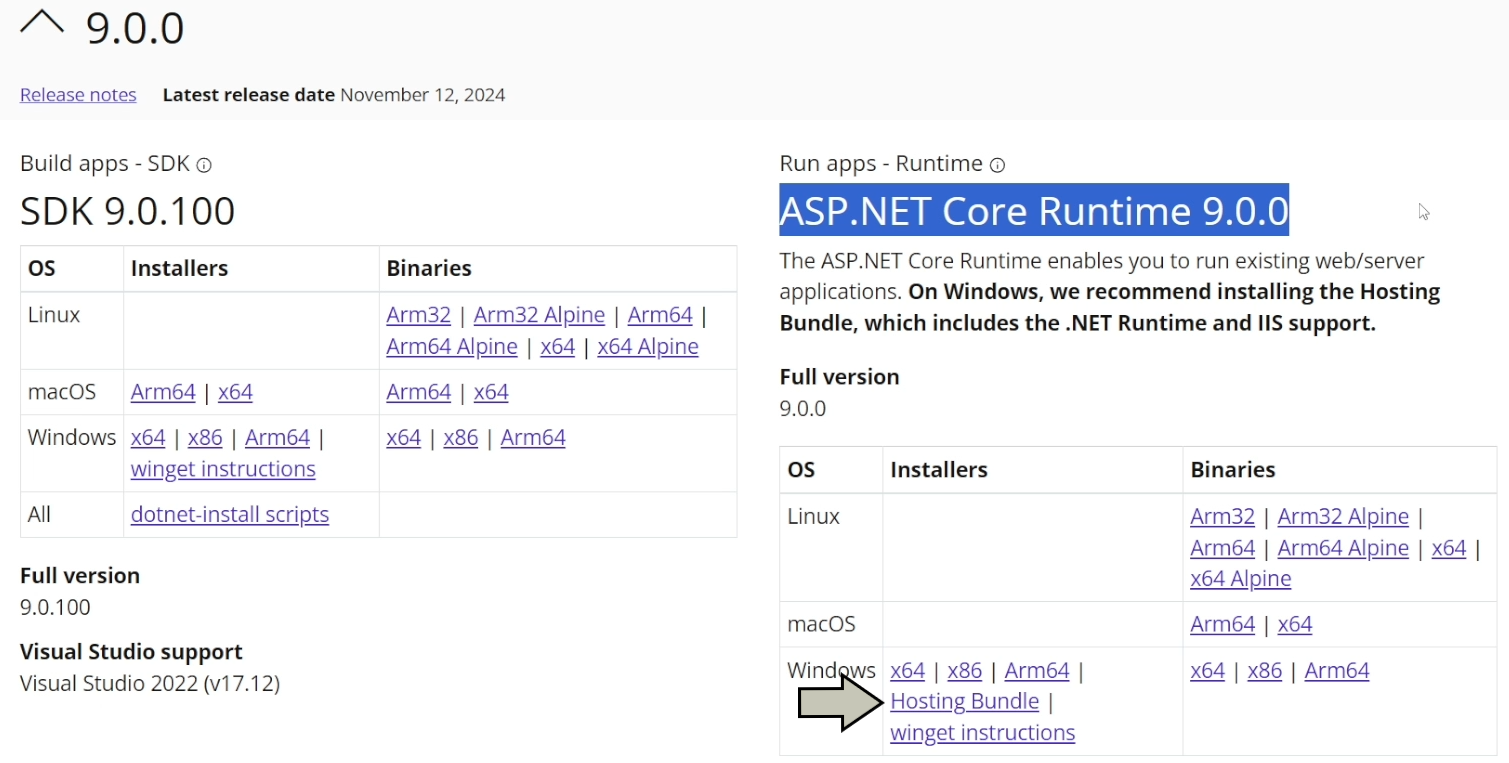
You'll also need to update the ASP.NET Core Runtime version that is installed on your server to version 9. If you use IIS, ensure that you use the Windows Hosting Bundle installer.
Watch the video
Watch our video where we go through the steps to update .NET 9, review the breaking changes and ask whether you should upgrade to .NET 9 or stick with your current .NET version.
Related pages


