
TypedResults or Results for Minimal API responses?

I found out that you can use either TypedResults or Results in minimal API responses. I wondered why they were two of them and importantly which one should we be using?
On the surface, it looks like it's doing the same thing:
// ProductDto.cs
public record ProductDto(int Id, string Name);
app.MapGet("/product/results",
() => Results.Ok(new ProductDto(1, "Watch")));
app.MapGet("/product/typed-results",
() => TypedResults.Ok(new ProductDto(1, "Watch")));I was confused. The only difference is the name of the type. But then I discovered something when looking at the OpenAPI documentation in more detail:
...
"paths": {
	"/product/results": {
		"get": {
			"tags": [
				"RoundTheCode.MinimalApi"
			],
			"responses": {
				"200": {
					"description": "OK"
				}
			}
		}
	},
	"/product/typed-results": {
		"get": {
			"tags": [
				"RoundTheCode.MinimalApi"
			],
			"responses": {
				"200": {
					"description": "OK",
					"content": {
						"application/json": {
							"schema": {
								"$ref": "#/components/schemas/ProductDto"
							}
						}
					}
				}
			}
		}
	}
},
"components": {
	"schemas": {
		"ProductDto": {
			"required": [
				"id",
				"name"
			],
			"type": "object",
			"properties": {
				"id": {
					"type": "integer",
					"format": "int32"
				},
				"name": {
					"type": "string"
				}
			}
		}
	}
},
...
The TypedResults path specifies that the content comes from the ProductDto. The Results path doesn't do that.
This is confirmed when I look at my Scalar document:
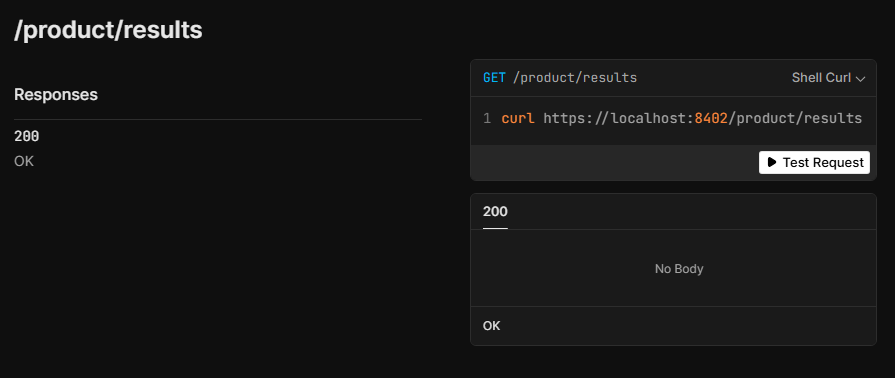
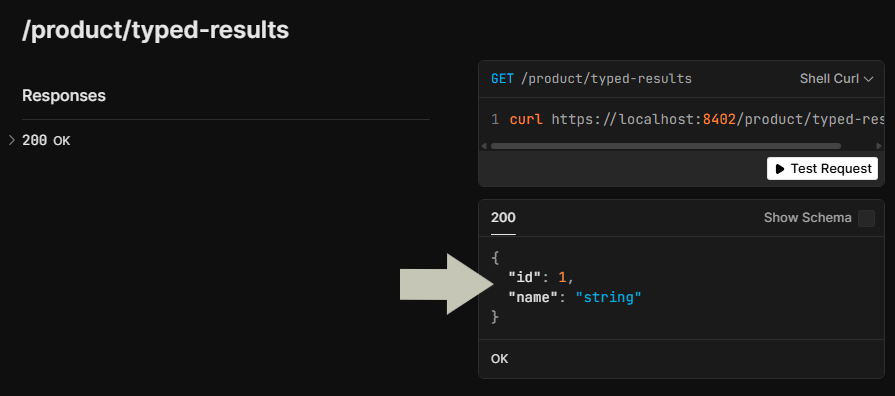
So with that in mind it would recommended to use the TypedResults type. But we've only tried it with returning an object type. What about some of the other response types? Do they do the same thing with Results and TypedResults?
The different return types
I was overwhelmed by the number of different return types there are. As our time is precious, I've gone through the ones that I think are the most common:
JSON
This returns a response in a JSON format. You can use anonymous types like in this snippet:
// Program.cs
app.MapGet("/json", () => TypedResults.Json(new { Id = 1 }));
By default, minimal API apps will use the web defaults for returning JSON. If you wish to change it, you can call ConfigureHttpJsonOptions extension method in the IServiceCollection type.
Here we are ensuring that the property naming policy is camel case, a pretty response is returned and nullable properties are not returned:
// Program.cs
builder.Services.ConfigureHttpJsonOptions(options => {
	options.SerializerOptions.PropertyNamingPolicy = JsonNamingPolicy.CamelCase;
	options.SerializerOptions.WriteIndented = true;
	options.SerializerOptions.DefaultIgnoreCondition = JsonIgnoreCondition.WhenWritingNull;
});
There are a large number of JSON options that you can configure. You can also configure JSON serialisation for an individual route.
But I wanted to change one for a specific route! You can do that by creating your own JsonSerializerOptions class, and then add it to the response.
Here we are changing the JSON naming policy to snake case upper but only for the /json-custom route:
// Program.cs
app.MapGet("/json-custom",
	() => Results.Json(new { Id = 1 }, new JsonSerializerOptions
	{
		PropertyNamingPolicy = JsonNamingPolicy.SnakeCaseUpper
	}));
Custom status code
I found that a number of status codes have their own method like Ok and NotFound. But if you find that one doesn't exist, you can use the StatusCode method to return it, like this one:
// Program.cs
app.MapGet("/im-a-teapot", () => TypedResults.StatusCode(StatusCodes.Status418ImATeapot));
Internal server error
Hopefully you won't need this one. But If you ever have to return an internal server error and a message as part of the response, you can call the InternalServerError method:
// Program.cs
app.MapGet("/internal-server-error",
	() => TypedResults.InternalServerError("Broken"));
Problem and ValidationProblem
When there is a problem with your endpoint, you can use either the Problem or ValidationProblem extension method to return a response:
// Program.cs
app.MapGet("/problem",
	() => TypedResults.Problem("There is an error", statusCode: StatusCodes.Status403Forbidden));
app.MapGet("/validation-problem",
	() => {
		var problems = new Dictionary<string, string[]> { { "Id", ["Missing"] } };

		return TypedResults.ValidationProblem(problems);
	});
ValidationProblem will always return a 400 response so this is ideal for form requests that have errors. With the Problem extension method, you can choose which status code to return.
Text
Returning plain text responses is done by using the Text extension method. I've used this in the past to return dynamic robots.txt files.
// Program.cs
app.MapGet("/robots.txt", () => TypedResults.Text("User-agent: *"));
Redirect
The Redirect extension method allows you to redirect a route to another route. And you can choose whether to make it permanent by setting the permanent parameter. If it's set to true, it will return a 301 response. Otherwise, it will return a 302 response.
// Program.cs
app.MapGet("/permanent-redirect", () => TypedResults.Redirect("/", permanent: true));
app.MapGet("/temporary-redirect", () => TypedResults.Redirect("/", permanent: false));
File
If you want to download a file, you can return the File extension method.
However it works differently if you use Results or TypedResults. If you use Results, you can specify the file name. But if you use TypedResults, you need to download the file into a stream and then return that stream as part of the response.
You can also specify the mime type and the name of the file downloaded for each of these:
// Program.cs
app.MapGet("/file", () =>
{
	var filePath = $"{AppDomain.CurrentDomain.BaseDirectory}/File/RoundTheCode.txt";
	return Results.File(
		filePath,
		contentType: "text/plain",
		fileDownloadName: "RoundTheCode.txt"
	);
});
app.MapGet("/file-from-stream", async() =>
{
	var filePath = $"{AppDomain.CurrentDomain.BaseDirectory}/File/RoundTheCode.txt";
	return TypedResults.File(
		await File.ReadAllBytesAsync(filePath),
		contentType: "text/plain",
		fileDownloadName: "RoundTheCode.txt"
	);
});
Returning different response types
I needed to return different response types for a route. I wanted to throw a not found error if I couldn't find an ID, otherwise I would return a ProductDto type as an OK response.
This is the clever part as you can specify that the Results type is going to be returned. But you can also set generic types within that. This examples specifies that the endpoint will return an Ok type with a ProductDto type, as well as a NotFound type.
// Program.cs
app.MapGet("/different-responses/{id:int}",
	Results<Ok<ProductDto>, NotFound>
	(int id) =>
{
	if (id > 1)
	{
		return TypedResults.NotFound();
	}

	return TypedResults.Ok(new ProductDto(id, "Abc"));
});
Manually specifying the response types
Even with using TypedResults, there are some response types that can have a number of status codes returned. For example, the Redirect response type can return a 301 or 302 response code. As a result, the Scalar document will output an expected 200 response if there is more than one. This also happens with the StatusCode and Problem response types that we covered.
But you can be specific about which response codes are returned in an minimal API route. This is done by calling the Produces extension method. And you can call it multiple times if you have more than one expected response code:
app.MapGet("/permanent-redirect", () => TypedResults.Redirect("/", permanent: true))
	.Produces(StatusCodes.Status301MovedPermanently);
You can also add attributes to the endpoint handler to override the endpoint summary, description and specify which response code it returns:
app.MapGet("/permanent-redirect", () => TypedResults.Redirect("/", permanent: true))
	.Produces(StatusCodes.Status301MovedPermanently);
You'll see how it looks in the Scalar document when you watch this video:
I also cover TypedResults and Results in it as well as going through some of the different response types.
And whilst watching the video, you can download the code example so you can follow along and try these examples out for yourself.
Final thoughts
So TypedResults or Results? Well it has to be TypedResults as it returns a more specific response type and it will often add the expected response code to the OpenAPI documentation.
As mentioned, I found that some TypedResults methods like Redirect didn't add the correct response codes to the OpenAPI schema. But that is because more than one status code could be returned.
In addition, I'm surprised about the number of response types that have their own methods. Just because it's called minimal APIs doesn't mean you have a minimal number of response types to return.
Related pages
