How to use xUnit to run unit testing in .NET and C#
Published: Tuesday 2 April 2024
Software companies all over the world use unit testing to automate tests for their systems.
- xUnit
- nUnit
- MSTest
This tutorial will focus on xUnit and it will look on how to write unit tests using the Fact and Theory attributes.
Assert methods which tells you whether a test has passed or not.
Creating an xUnit project in Visual Studio
In Visual Studio, create a new project, and do a search for xUnit. Select the C# template.
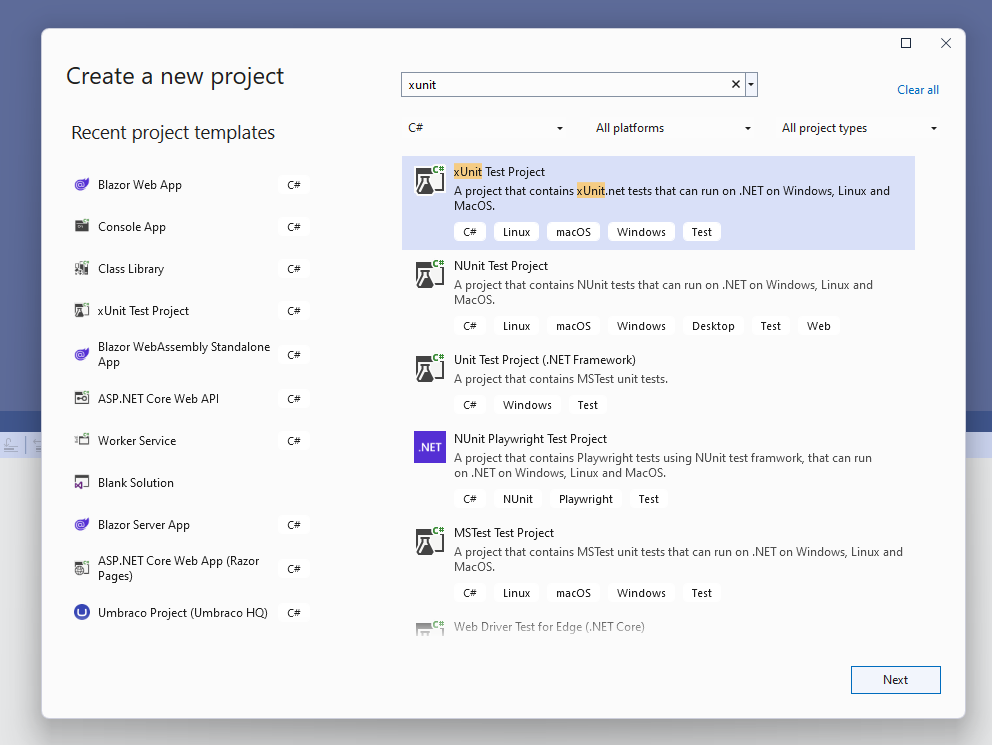
Create an xUnit project in Visual Studio
Go through the steps to create the project.
Creating a class library
With the xUnit project created, we need something to test.
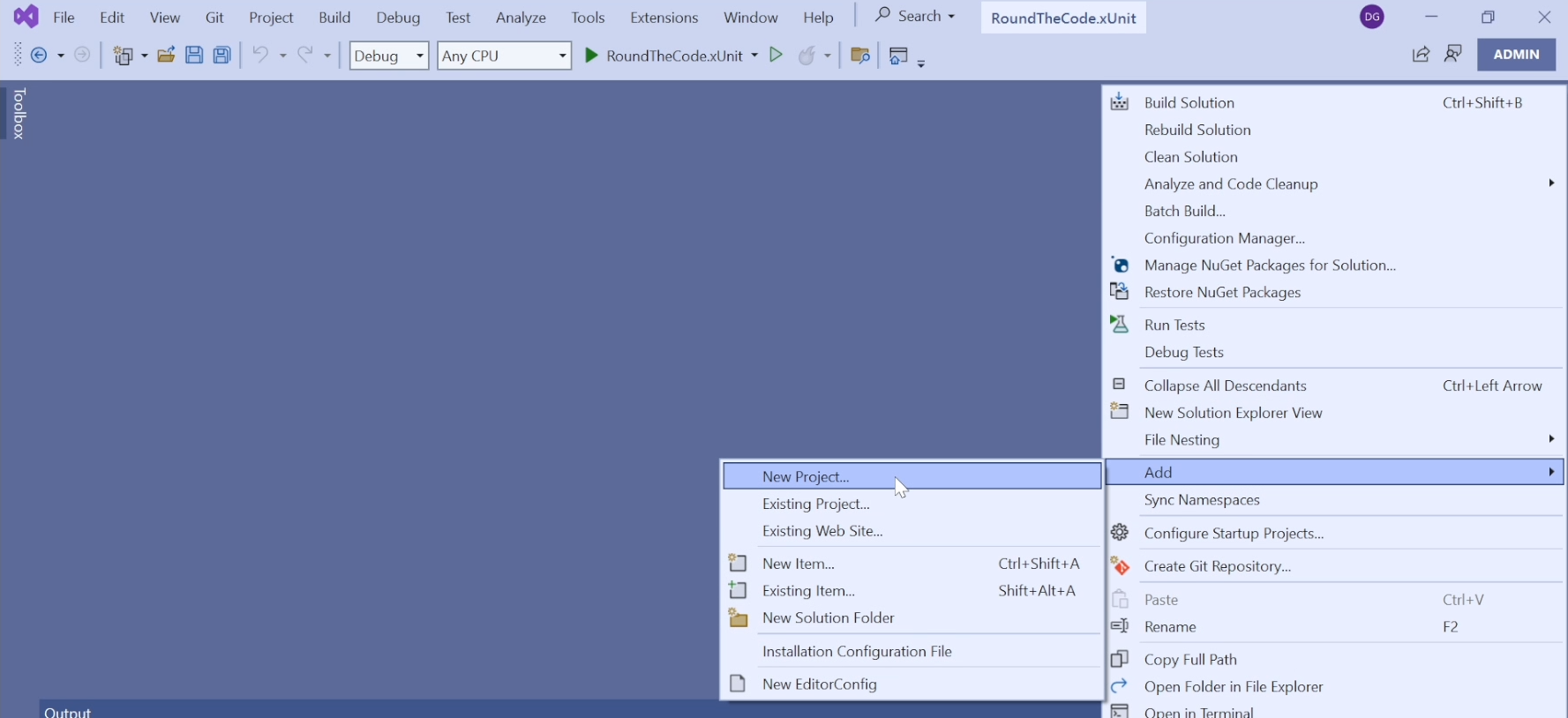
Create a class library within a solution in Visual Studio
Do a search for Class Library in C# and go through the steps to create the project.
Writing methods to test
In the class library, we are going to create a new class called NumberHelper.
// NumberHelper.cs
public static class NumberHelper
{
    public static bool IsOddNumber(int number)
    {
        return number % 2 == 1;
    }

    public static bool IsEvenNumber(int number)
    {
        return number % 2 == 0;
    }

	public static string RatingScore(int number) => number switch
	{
		< 3 => "Bad",
		>= 3 and < 7 => "Ok",
		>= 7 and <= 10 => "Great",
		_ => "Unknown"
	};
}
Writing these methods will help you with some of the different Assert methods that are available in xUnit.
Writing xUnit tests
Before writing the xUnit tests, make sure you that your xUnit test project has a reference to the class library. This is because we are going to be writing unit tests for the NumberHelper static class.
NumberHelperFactTests and add these tests:
// NumberHelperFactTests.cs
public class NumberHelperFactTests
{
	public void IsOddNumber_ValueOf3_ShouldReturnTrue()
	{
		// Act
		Assert.True(NumberHelper.IsOddNumber(3));
	}

	public void IsOddNumber_ValueOf6_ShouldReturnFalse()
	{
		// Act
		Assert.False(NumberHelper.IsOddNumber(6));
	}

	public void IsEvenNumber_ValueOf3_ShouldReturnFalse()
	{
		// Act
		Assert.False(NumberHelper.IsEvenNumber(3));
	}

	public void IsEvenNumber_ValueOf6_ShouldReturnTrue()
	{
		// Act
		Assert.True(NumberHelper.IsEvenNumber(6));
	}
}
For this, we have written a number of methods with each one being a separate test.
IsOddNumber method and whether passing in a certain number should return true or false.
IsEvenNumber method.
Assert.True or Assert.False methods have to match the parameter passed into it for the unit test to be successful.
Using the Fact attribute
At present, these tests won't run.
Fact attribute to each of the tests. This tells xUnit that it's a unit test method that needs to be run.
public class NumberHelperFactTests
{
	[Fact]
	public void IsOddNumber_ValueOf3_ShouldReturnTrue()
	{
		// Act
		Assert.True(NumberHelper.IsOddNumber(3));
	}

	[Fact]
	public void IsOddNumber_ValueOf6_ShouldReturnFalse()
	{
		// Act
		Assert.False(NumberHelper.IsOddNumber(6));
	}

	[Fact]
	public void IsEvenNumber_ValueOf3_ShouldReturnFalse()
	{
		// Act
		Assert.False(NumberHelper.IsEvenNumber(3));
	}

	[Fact]
	public void IsEvenNumber_ValueOf6_ShouldReturnTrue()
	{
		// Act
		Assert.True(NumberHelper.IsEvenNumber(6));
	}
}
How to run xUnit tests
With the test methods set up, we can now run them.
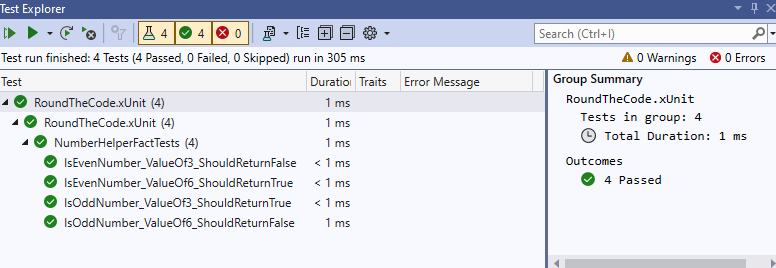
Passed xUnit tests using Test Explorer in Visual Studio
Multiple xUnit test projects in the same method
The Fact attribute allows us to run one test on that particular method.
Introducing the Theory attribute
The Theory attribute allows us to do just that.
InlineData attribute, it allows us to pass a parameter into the unit test.
InlineData attributes, we can pass in different parameters to the same method, therefore creating multiple tests on the same method.
// NumberHelperTheoryTests.cs
public class NumberHelperTheoryTests
{
    [Theory]
    [InlineData(3)]
    [InlineData(5)]
    [InlineData(7)]
    public void IsOddNumber_Values_ShouldReturnTrue(int number)
    {
        // Act
        Assert.True(NumberHelper.IsOddNumber(number));
    }

    [Theory]
    [InlineData(2)]
    [InlineData(4)]
    [InlineData(6)]
    public void IsOddNumber_Values_ShouldReturnFalse(int number)
    {
        // Act
        Assert.False(NumberHelper.IsOddNumber(number));
    }

    [Theory]
    [InlineData(3)]
    [InlineData(5)]
    [InlineData(7)]
    public void IsEvenNumber_Values_ShouldReturnFalse(int number)
    {
        // Act
        Assert.False(NumberHelper.IsEvenNumber(number));
    }

    [Theory]
    [InlineData(2)]
    [InlineData(4)]
    [InlineData(6)]
    public void IsEvenNumber_Values_ShouldReturnTrue(int number)
    {
        // Act
        Assert.True(NumberHelper.IsEvenNumber(number));
    }
}
When testing the IsOddNumber method to ensure it returns true, we are passing in 3, 5 and 7 in separate InlineData attributes.
InlineData attribute gets passed in as the number parameter as part of the method.
IsOddNumber expecting the result to return false. This time, we add 2, 4 and 6 to separate InlineData attributes as we don't expect them to be odd numbers.
IsEvenNumber method.
Different Assert methods
So far, we have used Assert.True and Assert.False methods. But what about some of the other Assert methods?
NumberHelper class, we created a RatingScore method. We are going to carry out some unit tests by using the Assert.Equal and Assert.NotEqual methods.
Adding Fact tests
In NumberHelperFactTests class, add these test methods to it:
// NumberHelperFactTests.cs
public class NumberHelperFactTests {

	...
	[Fact]
	public void RatingScore_ValueOf7_EqualsGreat()
	{
		Assert.Equal("Great", NumberHelper.RatingScore(7));
	}

	[Fact]
	public void RatingScore_ValueOf7_NotEqualsBad()
	{
		Assert.NotEqual("Bad", NumberHelper.RatingScore(7));
	}
}
The first test ensures that when we pass in 7 into the RatingScore method, it returns Great.
Bad.
Adding Theory tests
We can also do the same by adding Theory tests for this method.
NumberHelperTheoryTests class, add these test methods to it:
// NumberHelperTheoryTests.cs
public class  NumberHelperTheoryTests {

	...
	[Theory]
	[InlineData(2, "Bad")]
	[InlineData(5, "Ok")]
	[InlineData(9, "Great")]
	public void RatingScore_Values_EqualCorrectRating(int number, string rating)
	{
		Assert.Equal(rating, NumberHelper.RatingScore(number));
	}
}
This test passes in two methods. The first is the number and the second is the expected rating response.
How to debug a test
If a test is not working, you can add breakpoints into the methods that are being tested to step through your code and debug.
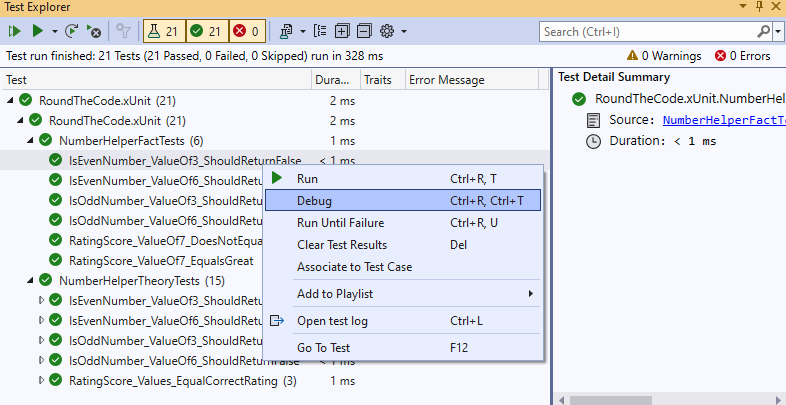
Debug an xUnit test method in Visual Studio
Watch our video tutorial
Watch our video where you'll learn more about what we covered in this tutorial.
Fact and Theory attributes.
Assert methods and how to debug a test.As well as that, you can download the code example which allows you to try out xUnit whilst following the tutorial.
Related tutorials
