
Can ChatGPT build an ASP.NET Core login form in 10 minutes?

We asked ChatGPT to build a register and login form for an ASP.NET Core application.
We gave it 10 minutes to see what code it would generate and then tested it to see if it would compile and run.
ChatGPT demo
When using ChatGPT, you need to be as specific as you can particularly if you are asking it to come up with a complex solution like we are.
The prompt
This is the question that we asked it:
Build me an ASP.NET Core application. We want to consist of a home page, registration page, login page and authorised page. On the registration page, a user can fill in their email address and password and submit the form. These details will be sent through to an ASP.NET Core controller and store the user in memory. The user should be able to login with the same credentials and it should generate a JWT token for that authenticated user. The authorised page can only be viewed if the user is logged in. A 401 response should return if they are not logged in. The application should also have any CSS added for the form and the pages.
And this is what it produced:
using Microsoft.AspNetCore.Authentication.JwtBearer;
using Microsoft.AspNetCore.Authorization;
using Microsoft.AspNetCore.Mvc;
using Microsoft.IdentityModel.Tokens;
using System.IdentityModel.Tokens.Jwt;
using System.Security.Claims;
using System.Text;

var builder = WebApplication.CreateBuilder(args);

var key = Encoding.ASCII.GetBytes("your_secret_key_here");

builder.Services.AddAuthentication(x =>
{
	x.DefaultAuthenticateScheme = JwtBearerDefaults.AuthenticationScheme;
	x.DefaultChallengeScheme = JwtBearerDefaults.AuthenticationScheme;
})
.AddJwtBearer(x =>
{
	x.RequireHttpsMetadata = false;
	x.SaveToken = true;
	x.TokenValidationParameters = new TokenValidationParameters
	{
		ValidateIssuerSigningKey = true,
		IssuerSigningKey = new SymmetricSecurityKey(key),
		ValidateIusser = false,
		ValidateAudience = false
	};
});

builder.Services.AddAuthorization();

var app = builder.Build();

app.UseAuthentication();
app.UseAuthorization();

var users = new Dictionary<string, string>();

app.MapPost("/register", (UserModel user) =>
{
	if (users.ContainsKey(user.Email)) {
		return Results.BadRequest("User already exists");

	user[user.Email] = user.Password;
	return Results.Ok("User registered successfully");
});

app.MapPost("/login", (UserModel user) =>
{
	if (!users.TryGetValue(user.Email, out var storedPassword) || storedPassword != User.Password)
		return Results.Unauthorized();

	var tokenHandler = new JwtSecurityTokenHandler();
	var tokenDescriptor = new SecurityTokenDescriptor
	{
		Subject = new ClaimsIdentity(new[] { new Claim(CalimTypes.Name, user.Email) }),
		Expires = DateTime.UtcNow.AddHours(1),
		SigningCredentials = new SigningCredentials(new SymmetricSecurityKey(key)
	});
	var token = tokenHandler.CreateToken(tokenDescriptor);
	var tokenString = tokenHandler.WriteToken(token);

	return Results.Ok(new { Token = tokenString });
});

app.MapGet("/authorized", [Authorize] () => Results.Ok("This is a protected page"));

app.MapGet("/", () => Results.Content(File.ReadAllText("wwwroot/index.html")));
app.MapGet("/register", () => Results.Content(File.ReadAllText("wwwroot/register.html")));
app.MapGet("/login", () => Results.Content(File.ReadAllText("wwwroot/login.html")));

app.Run();

public record UserModel(string Email, string Password);
A good first attempt. But we weren't specific enough in the original prompt as it used Minimal APIs for the controller endpoints. It also didn't generate any of the CSS or HTML that we asked it to. More on that in a bit.
Next we asked it to generate an image on how it would look. We asked it the following:
Can you show me how it's going to look through an image?
We were down to six minutes left at this point, and it was still generating the image 30 seconds after we asked it to. So we stopped it from generating the image. After the 10 minutes was complete, we looked back at the conversation and saw that it generated these images for us:
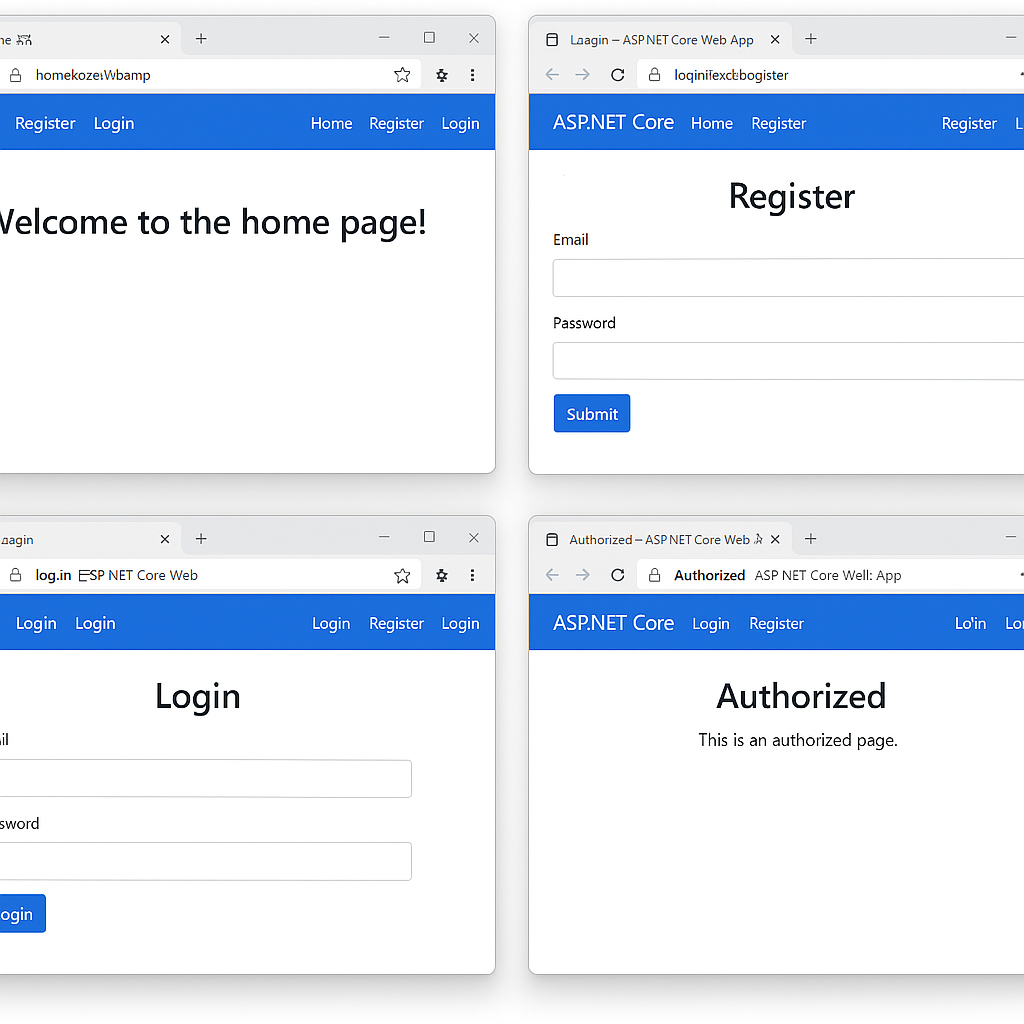
The text in the address bar looks a little strange but at least we had an idea of how it was going to look.
Missing CSS and views
A mystery though is how it managed to generate those images as we noticed it hadn't generated any HTML and CSS as part of the original prompt. So we asked it to do that:
Are you able to supply any CSS? Also I can't see any views or HTML anywhere.
At this point it did generate the views, but it generated them in code. It added commands to write the file using the File class in System.IO. It also generated the CSS, but once again it used file commands.
Unfortunately, we don't have the code to show you that but we asked it to replace Minimal APIs with ASP.NET Core controllers and views. This is what we asked it:
Can you produce the code so it uses ASP.NET Core controllers and views.
It then produced the following code:
using Microsoft.AspNetCore.Authentication.Cookies;
using Microsoft.AspNetCore.Authorization;
using Microsoft.AspNetCore.Mvc;
using Microsoft.AspNetCore.Identity;
using Microsoft.EntityFrameworkCore;
using Microsoft.IdentityModel.Tokens;
using System.IdentityModel.Tokens.Jwt;
using System.Security.Claims;
using System.Text;

var builder = WebApplication.CreateBuilder(args);

builder.Services.AddControllersWithViews();
builder.Services.AddAuthentication(CookieAuthenticationDefaults.AuthenticationScheme)
    .AddCookie(options =>
    {
        options.LoginPath = "/Account/Login";
        options.LogoutPath = "/Account/Logout";
    });

builder.Services.AddAuthorization();

builder.Services.AddSingleton<UserService>();

var app = builder.Build();

app.UseStaticFiles();
app.UseRouting();
app.UseAuthentication();
app.UseAuthorization();

app.MapControllerRoute(
    name: "default",
    pattern: "{controller=Home}/{action=Index}/{id?}");

app.Run();

public class UserModel
{
    public string Email { get; set; }
    public string Password { get; set; }
}

public class UserService
{
    private readonly Dictionary<string, string> _users = new();

    public bool Register(string email, string password)
    {
        if (_users.ContainsKey(email)) return false;
        _users[email] = password;
        return true;
    }

    public bool ValidateUser(string email, string password) =>
        _users.TryGetValue(email, out var storedPassword) && storedPassword == password;
}

[Route("/")]
public class HomeController : Controller
{
    public IActionResult Index() => View();
}

[Route("/Account")]
public class AccountController : Controller
{
    private readonly UserService _userService;

    public AccountController(UserService userService)
    {
        _userService = userService;
    }

    [HttpGet("Register")]
    public IActionResult Register() => View();

    [HttpPost("Register")]
    public IActionResult Register(UserModel model)
    {
        if (_userService.Register(model.Email, model.Password))
            return RedirectToAction("Login");
        return View();
    }

    [HttpGet("Login")]
    public IActionResult Login() => View();

    [HttpPost("Login")]
    public IActionResult Login(UserModel model)
    {
        if (_userService.ValidateUser(model.Email, model.Password))
        {
            var claims = new List<Claim> { new Claim(ClaimTypes.Name, model.Email) };
            var identity = new ClaimsIdentity(claims, CookieAuthenticationDefaults.AuthenticationScheme);
            var principal = new ClaimsPrincipal(identity);
            HttpContext.SignInAsync(CookieAuthenticationDefaults.AuthenticationScheme, principal);
            return RedirectToAction("AuthorizedPage");
        }
        return View();
    }

    [Authorize]
    [HttpGet("AuthorizedPage")]
    public IActionResult AuthorizedPage() => View();

    [HttpPost("Logout")]
    public IActionResult Logout()
    {
        HttpContext.SignOutAsync(CookieAuthenticationDefaults.AuthenticationScheme);
        return RedirectToAction("Login");
    }
}
It generated the code using ASP.NET Core MVC controllers. However, it had managed to overwrite the CSS and HTML that it had originally generated.
So we asked it:
What about the views for the controllers? I can't see any HTML anywhere.
It did add the HTML code back, but once again it was stored in code and there was no sign of the CSS:
using Microsoft.AspNetCore.Authentication.Cookies;
using Microsoft.AspNetCore.Authorization;
using Microsoft.AspNetCore.Mvc;
using Microsoft.AspNetCore.Identity;
using Microsoft.EntityFrameworkCore;
using Microsoft.IdentityModel.Tokens;
using System.IdentityModel.Tokens.Jwt;
using System.Security.Claims;
using System.Text;

var builder = WebApplication.CreateBuilder(args);

builder.Services.AddControllersWithViews();
builder.Services.AddAuthentication(CookieAuthenticationDefaults.AuthenticationScheme)
    .AddCookie(options =>
    {
        options.LoginPath = "/Account/Login";
        options.LogoutPath = "/Account/Logout";
    });

builder.Services.AddAuthorization();

builder.Services.AddSingleton<UserService>();

var app = builder.Build();

app.UseStaticFiles();
app.UseRouting();
app.UseAuthentication();
app.UseAuthorization();

app.MapControllerRoute(
    name: "default",
    pattern: "{controller=Home}/{action=Index}/{id?}");

app.Run();

public class UserModel
{
    public string Email { get; set; }
    public string Password { get; set; }
}

public class UserService
{
    private readonly Dictionary<string, string> _users = new();

    public bool Register(string email, string password)
    {
        if (_users.ContainsKey(email)) return false;
        _users[email] = password;
        return true;
    }

    public bool ValidateUser(string email, string password) =>
        _users.TryGetValue(email, out var storedPassword) && storedPassword == password;
}

[Route("/")]
public class HomeController : Controller
{
    public IActionResult Index() => View();
}

[Route("/Account")]
public class AccountController : Controller
{
    private readonly UserService _userService;

    public AccountController(UserService userService)
    {
        _userService = userService;
    }

    [HttpGet("Register")]
    public IActionResult Register() => View();

    [HttpPost("Register")]
    public IActionResult Register(UserModel model)
    {
        if (_userService.Register(model.Email, model.Password))
            return RedirectToAction("Login");
        return View();
    }

    [HttpGet("Login")]
    public IActionResult Login() => View();

    [HttpPost("Login")]
    public IActionResult Login(UserModel model)
    {
        if (_userService.ValidateUser(model.Email, model.Password))
        {
            var claims = new List<Claim> { new Claim(ClaimTypes.Name, model.Email) };
            var identity = new ClaimsIdentity(claims, CookieAuthenticationDefaults.AuthenticationScheme);
            var principal = new ClaimsPrincipal(identity);
            HttpContext.SignInAsync(CookieAuthenticationDefaults.AuthenticationScheme, principal);
            return RedirectToAction("AuthorizedPage");
        }
        return View();
    }

    [Authorize]
    [HttpGet("AuthorizedPage")]
    public IActionResult AuthorizedPage() => View();

    [HttpPost("Logout")]
    public IActionResult Logout()
    {
        HttpContext.SignOutAsync(CookieAuthenticationDefaults.AuthenticationScheme);
        return RedirectToAction("Login");
    }
}

// Create View Files
Directory.CreateDirectory("Views/Home");
Directory.CreateDirectory("Views/Account");

File.WriteAllText("Views/Home/Index.cshtml", """
@{
    ViewData["Title"] = "Home";
}
<h1>Welcome to the Home Page</h1>
<a href='/Account/Register'>Register</a> | <a href='/Account/Login'>Login</a>
""");

File.WriteAllText("Views/Account/Register.cshtml", """
@{
    ViewData["Title"] = "Register";
}
<h2>Register</h2>
<form method='post'>
    <input type='email' name='Email' placeholder='Email' required />
    <input type='password' name='Password' placeholder='Password' required />
    <button type='submit'>Register</button>
</form>
""");

File.WriteAllText("Views/Account/Login.cshtml", """
@{
    ViewData["Title"] = "Login";
}
<h2>Login</h2>
<form method='post'>
    <input type='email' name='Email' placeholder='Email' required />
    <input type='password' name='Password' placeholder='Password' required />
    <button type='submit'>Login</button>
</form>
""");

File.WriteAllText("Views/Account/AuthorizedPage.cshtml", """
@{
    ViewData["Title"] = "Authorized Page";
}
<h2>Welcome, you are authorized!</h2>
<form method='post' action='/Account/Logout'>
    <button type='submit'>Logout</button>
</form>
""");
At this point, our 10 minutes had expired so we added the final generated code to an ASP.NET Core application to see if it would compile and run.
The final results
Looking at the results, we noticed that it had imported Microsoft.EntityFrameworkCore despite the fact that we told it to store the users in memory and made no mention of Entity Framework in any of our prompts.
As well as that, the UserModel didn't specify any default values for the properties, or declare that they were nullable. Bit of a minor one, but it did throw up a warning.
It also didn't generated a Shared/Layout.cshtml file so we had to create our own one and call the RenderBody() method so it would render the HTML to the application.
And the CSS was still missing from the code that was produced.
But we did have a working application and you can find out how well it worked by watching our video:
Final thoughts
Although it's work in progress, ChatGPT was able to produce a working ASP.NET Core application with a register and login form in 10 minutes.
Yes it struggles with more complex solutions and can easily make mistakes. But it's no wonder .NET developers are wondering if their job is going to be taken over by AI in the near future.
However you can use ChatGPT to your advantage. Use it to gain new skill sets and improve the speed in which you write code.
We think it's a very good tool for .NET developers.
Related articles

