
ASP.NET Core dependency injection lifetimes explained

Singleton, scoped and transient. These are the different service lifetimes available in ASP.NET Core dependency injection.
But how does each one work?
The different service lifetimes
You have to register your service with one of these lifetimes:
Singleton
Singleton service lifetime instances will have a single instance for the lifetime of the application. These instances can be shared across multiple users of the same application.
Storing data that rarely changes and is shared with multiple users is a good use case for this. This may include cached data or configuration values.
Scoped
A scoped service lifetime can have multiple instances in the same application. In ASP.NET Core, a scope is created once per HTTP request.
Scoped service lifetime instances are good if you want to share the same instance across multiple areas of a request. This could include working with Entity Framework's DbContext where you want all instances in a request to share the same context.
You can also define custom scopes which is useful for background tasks and multithreading.
Transient
Every time a transient service lifetime is injected, it will create a new instance.
This is ideal for services that are lightweight, stateless and don't need to be shared. Examples of this include performing calculations, or formatting a message.
How to add services in ASP.NET Core
There are two ways to add a service for dependency injection use in ASP.NET Core.
You can either set up a service with just a class:
public class CategorySingletonService
{
	public DateTime UtcTime { get; }

	public CategorySingletonService()
	{
		UtcTime = DateTime.UtcNow;
	}
}

public class CategoryScopedService
{
	public DateTime UtcTime { get; }

	public CategoryScopedService(CategorySingletonService categorySingletonService)
	{
		UtcTime = DateTime.UtcNow;
	}
}

public class CategoryTransientService
{
	public DateTime UtcTime { get; }

	public CategoryTransientService()
	{
		UtcTime = DateTime.UtcNow;
	}
}
Or you can use a class that implements an interface and set up the service with that interface. This is a better way to do it because:
- Consumers of a service don't need to know the exact implementation
- It makes it easier to mock the service for unit tests
- There is support for multiple implementations of the same service
public interface IProductSingletonService
{
	DateTime UtcTime { get; }
}

public interface IProductScopedService
{
	DateTime UtcTime { get; }
}

public interface IProductTransientService
{
	DateTime UtcTime { get; }
}

public class ProductSingletonService : IProductSingletonService
{
	public DateTime UtcTime { get; }

	public ProductSingletonService()
	{
		UtcTime = DateTime.UtcNow;
	}
}

public class ProductScopedService : IProductScopedService
{
	public DateTime UtcTime { get; }

	public ProductScopedService(IProductSingletonService productSingletonService)
	{
		UtcTime = DateTime.UtcNow;
	}
}

public class ProductTransientService : IProductTransientService
{
	public DateTime UtcTime { get; }

	public ProductTransientService()
	{
		UtcTime = DateTime.UtcNow;
	}
}
In ASP.NET Core, these services are added to the WebApplicationBuilder instance before the application is built. You add the services using a number of IServiceCollection extension methods in Program.cs, such as AddSingleton, AddScoped and AddTransient.
You can also use the TryAddSingleton, TryAddScoped and TryAddTransient extension methods. The difference being is that the Try extension methods will only add the service if it has not already been registered.
These are the different IServiceCollection extension methods available.
Add service type as a parameter
This is where you specify the service type as a parameter.
// Program.cs
builder.Services.AddSingleton(typeof(CategorySingletonService));
builder.Services.AddScoped(typeof(CategoryScopedService));
builder.Services.AddTransient(typeof(CategoryTransientService));

builder.Services.TryAddSingleton(typeof(CategorySingletonService));
builder.Services.TryAddScoped(typeof(CategoryScopedService));
builder.Services.TryAddTransient(typeof(CategoryTransientService));

builder.Services.AddSingleton(typeof(IProductSingletonService), typeof(ProductSingletonService));
builder.Services.AddScoped(typeof(IProductScopedService), typeof(ProductScopedService));
builder.Services.AddTransient(typeof(IProductTransientService), typeof(ProductTransientService));

builder.Services.TryAddSingleton(typeof(IProductSingletonService), typeof(ProductSingletonService));
builder.Services.TryAddScoped(typeof(IProductScopedService), typeof(ProductScopedService));
builder.Services.TryAddTransient(typeof(IProductTransientService), typeof(ProductTransientService));
One of the disadvantages of using these extension methods is that it will only throw an exception at runtime. Say we wrongly registered the IProductScopedService interface with the ProductSingletonService class in Program.cs, the exception will be thrown when the application is run rather than when it's built.
Add service type using the generic class extension methods
A better way is to add the services is using the generic class extension methods. This way, if you register the service incorrectly, any exception will be thrown when compiling.
// Program.cs
builder.Services.AddSingleton<CategorySingletonService>();
builder.Services.AddScoped<CategoryScopedService>();
builder.Services.AddTransient<CategoryTransientService>();

builder.Services.TryAddSingleton<CategorySingletonService>();
builder.Services.TryAddScoped<CategoryScopedService>();
builder.Services.TryAddTransient<CategoryTransientService>();

builder.Services.AddSingleton<IProductSingletonService, ProductSingletonService>();
builder.Services.AddScoped<IProductScopedService, ProductScopedService>();
builder.Services.AddTransient<IProductTransientService, ProductTransientService>();

builder.Services.TryAddSingleton<IProductSingletonService, ProductSingletonService>();
builder.Services.TryAddScoped<IProductScopedService, ProductScopedService>();
builder.Services.TryAddTransient<IProductTransientService, ProductTransientService>();
Create a new instance of the service type
You can also manually create a new instance of the service by using the implementation service methods. With these, you use a delegate which has the IServiceProvider type as a parameter. This is how you do it when defining a type as a parameter.
// Program.cs
builder.Services.AddSingleton(typeof(CategorySingletonService), (_) =>
{
	return new CategorySingletonService();
});
builder.Services.AddScoped(typeof(CategoryScopedService), (serviceProvider) =>
{
	return new CategoryScopedService(serviceProvider.GetRequiredService<CategorySingletonService>());
});
builder.Services.AddTransient(typeof(CategoryTransientService), (_) =>
{
	return new CategoryTransientService();
});

builder.Services.TryAddSingleton(typeof(CategorySingletonService), (_) =>
{
	return new CategorySingletonService();
});
builder.Services.TryAddScoped(typeof(CategoryScopedService), (serviceProvider) =>
{
	return new CategoryScopedService(serviceProvider.GetRequiredService<CategorySingletonService>());
});
builder.Services.TryAddTransient(typeof(CategoryTransientService), (_) =>
{
	return new CategoryTransientService();
});

builder.Services.AddSingleton(typeof(IProductSingletonService), (_) =>
{
	return new ProductSingletonService();
});
builder.Services.AddScoped(typeof(IProductScopedService), (serviceProvider) =>
{
	return new ProductScopedService(serviceProvider.GetRequiredService<IProductSingletonService>());
});
builder.Services.AddTransient(typeof(IProductTransientService), (_) =>
{
	return new ProductTransientService();
});

builder.Services.TryAddSingleton(typeof(IProductSingletonService), (_) =>
{
	return new ProductSingletonService();
});
builder.Services.TryAddScoped(typeof(IProductScopedService), (serviceProvider) =>
{
	return new ProductScopedService(serviceProvider.GetRequiredService<IProductSingletonService>());
});
builder.Services.TryAddTransient(typeof(IProductTransientService), (_) =>
{
	return new ProductTransientService();
});
Or you can use the generic class extension method:
// Program.cs
builder.Services.AddSingleton((_) =>
{
	return new CategorySingletonService();
});
builder.Services.AddScoped((serviceProvider) =>
{
	return new CategoryScopedService(serviceProvider.GetRequiredService<CategorySingletonService>());
});
builder.Services.AddTransient((_) =>
{
	return new CategoryTransientService();
});

builder.Services.TryAddSingleton((_) =>
{
	return new CategorySingletonService();
});
builder.Services.TryAddScoped((serviceProvider) =>
{
	return new CategoryScopedService(serviceProvider.GetRequiredService<CategorySingletonService>());
});
builder.Services.TryAddTransient((_) =>
{
	return new CategoryTransientService();
});

builder.Services.AddSingleton<IProductSingletonService, ProductSingletonService>((_) =>
{
	return new ProductSingletonService();
});
builder.Services.AddScoped<IProductScopedService, ProductScopedService>((serviceProvider) =>
{
	return new ProductScopedService(serviceProvider.GetRequiredService<IProductSingletonService>());
});
builder.Services.AddTransient<IProductTransientService, ProductTransientService>((_) =>
{
	return new ProductTransientService();
});

builder.Services.TryAddSingleton<IProductSingletonService>((_) =>
{
	return new ProductSingletonService();
});
builder.Services.TryAddScoped<IProductScopedService>((serviceProvider) =>
{
	return new ProductScopedService(serviceProvider.GetRequiredService<IProductSingletonService>());
});
builder.Services.TryAddTransient<IProductTransientService>((_) =>
{
	return new ProductTransientService();
});
When you need to inject another service into a constructor's parameter, you use the serviceProvider parameter and call either the GetService or GetRequiredService method. The difference is that the GetService extension method will return null if the service hasn't been registered, whereas GetRequiredService will throw an exception.
This example shows injecting the IProductSingletonService instance as a parameter when creating a new instance of ProductScopedService.
builder.Services.AddScoped<IProductScopedService, ProductScopedService>((serviceProvider) =>
{
	return new ProductScopedService(serviceProvider.GetRequiredService<IProductSingletonService>());
});
The different behaviour for each service lifetime
When you inject a singleton service lifetime instance, it will have the same instance for the lifetime of the application. Whereas the scoped service lifetime instance will have a different instance per request and the transient service lifetime instance will have a different instance every time it's injected.
// WebApiController.cs
[ApiController]
[Route("api/[controller]")]
public class WebApiController : ControllerBase
{
	private readonly IProductSingletonService _productSingletonService;
	private readonly IProductScopedService _productScopedService;
	private readonly IProductTransientService _productTransientService;

	public WebApiController(
		IProductSingletonService productSingletonService,
		IProductScopedService productScopedService,
		IProductTransientService productTransientService
	)
	{
		_productSingletonService = productSingletonService;
		_productScopedService = productScopedService;
		_productTransientService = productTransientService;
	}

	[HttpGet("service-lifetimes")]
	public IActionResult ServiceLifetimes()
	{
		return Ok(new
		{
			Singleton = _productSingletonService.UtcTime.ToString("HH:mm:ss.ffffff"),
			Scoped = _productScopedService.UtcTime.ToString("HH:mm:ss.ffffff"),
			Transient = _productTransientService.UtcTime.ToString("HH:mm:ss.ffffff")
		});
	}
}
When we execute the ServiceLifetimes endpoint for the first time, we get a result like this:
{
	"singleton": "19:11:12.124576",
	"scoped": "19:11:12.124699",
	"transient": "19:11:12.124786"
}
When we execute it again, the singleton instance stays the same, but the scoped and transient instance changes:
{
	"singleton": "19:11:12.124576",
	"scoped": "19:12:07.705216",
	"transient": "19:12:07.705245"
}
Injecting transient services in multiple areas
If you are using ASP.NET Core MVC, the singleton and scoped service lifetime instances will be shared across the MVC controller and Razor view. However, if you inject a transient service lifetime in a controller and then the same one in a view, you'll get a different instance.
We've created this ASP.NET Core MVC endpoint:
// MvcServiceLifetimeModel.cs
public record MvcServiceLifetimeModel(
	DateTime ControllerSingletonDate,
	DateTime ControllerScopedDate,
	DateTime ControllerTransientDate
);
// MvcController.cs
[Route("[controller]")]
public class MvcController : Controller
{
private readonly IProductSingletonService _productSingletonService;
private readonly IProductScopedService _productScopedService;
private readonly IProductTransientService _productTransientService;
public MvcController(
IProductSingletonService productSingletonService,
IProductScopedService productScopedService,
IProductTransientService productTransientService
)
{
_productSingletonService = productSingletonService;
_productScopedService = productScopedService;
_productTransientService = productTransientService;
}
[HttpGet("service-lifetimes")]
public IActionResult ServiceLifetimes()
{
return View(new MvcServiceLifetimeModel(
_productSingletonService.UtcTime,
_productScopedService.UtcTime,
_productTransientService.UtcTime
));
}
}Then in the view, we injected the same instances into the view to see what the differences are:
<!-- ServiceLifetimes.cshtml -->
@using RoundTheCode.DI.Models
@using RoundTheCode.DI.Services.Product
@inject IProductSingletonService productSingletonService
@inject IProductScopedService productScopedService
@inject IProductTransientService productTransientService
@model MvcServiceLifetimeModel
<h2>Singleton</h2>
<p>Controller: @Model.ControllerSingletonDate.ToString("HH:mm:ss.ffffff")</p>
<p>View: @productSingletonService.UtcTime.ToString("HH:mm:ss.ffffff")</p>
<h2>Scoped</h2>
<p>Controller: @Model.ControllerScopedDate.ToString("HH:mm:ss.ffffff")</p>
<p>View: @productScopedService.UtcTime.ToString("HH:mm:ss.ffffff")</p>
<h2>Transient</h2>
<p>Controller: @Model.ControllerTransientDate.ToString("HH:mm:ss.ffffff")</p>
<p>View: @productTransientService.UtcTime.ToString("HH:mm:ss.ffffff")</p>
This is the output in the view when we run the endpoint:
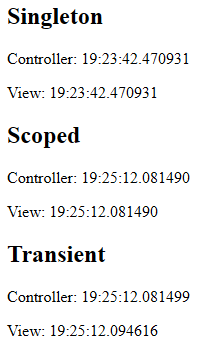
You'll notice that the singleton and scoped service lifetimes have the same time. But the transient service lifetime has a different one. That's because when the transient service lifetime is injected into the controller, it creates a separate instance to the one that's injected into the view.
Watch the video
Watch the video where we show you the different service lifetimes and how they work in an ASP.NET Core application:
And if you want to try it out for yourself you can download the code example that will allow to see how the different service lifetimes work.
Related pages
