
How to find a client's geolocation in .NET with IP lookup

There may be instances when you want to serve different content to clients based on their location.
Maybe you run an online ecommerce website and want to push prices using their local currency? Or maybe you want to add a discount to clients based in a certain country?
Adding geolocation to your .NET project allows you to add IP lookup and return the country where that IP address is located. And best of all, you can add it to your .NET project for free.
Adding geolocation to ASP.NET Core
We are going to add this to an ASP.NET Core Web API. We've set up a model that will store the geolocation of the client, such as the IP address and country name.
// GeoIpCountryModel.cs
public class GeoIpCountryModel
{
    public string IpAddress { get; }

    public string? CountryIsoCode { get; }

    public string? CountryName { get; }

    public IReadOnlyDictionary<string, string>? CountryNames { get; }

    public GeoIpCountryModel(string ipAddress, string? countryIsoCode, string? countryName, IReadOnlyDictionary<string, string>? countryNames)
    {
        IpAddress = ipAddress;
        CountryIsoCode = countryIsoCode;
        CountryName = countryName;
        CountryNames = countryNames;
    }
}
We've also set up a service where we'll write the functionality to lookup a country based on an IP address.
// IGeoIpService.cs
public interface IGeoIpService
{
    GeoIpCountryModel? GetCountry(string? ipAddress);
}
// GeoIpService.cs
public class GeoIpService : IGeoIpService, IDisposable
{
const string IP_ADDRESS_REGEX = "^(?:1)?(?:\\d{1,2}|2(?:[0-4]\\d|5[0-5]))\\.(?:1)?(?:\\d{1,2}|2(?:[0-4]\\d|5[0-5]))\\.(?:1)?(?:\\d{1,2}|2(?:[0-4]\\d|5[0-5]))\\.(?:1)?(?:\\d{1,2}|2(?:[0-4]\\d|5[0-5]))$";
public GeoIpService()
{
}
public GeoIpCountryModel? GetCountry(string? ipAddress)
{
return null;
}
public void Dispose()
{
}
}We'll add this to dependency injection as a singleton instance. It will become clearer later in the tutorial as to why we add this as a singleton.
// Program.cs
var builder = WebApplication.CreateBuilder(args);

...

// Added to dependency injection with a singleton lifetime
builder.Services.AddSingleton<IGeoIpService, GeoIpService>();

var app = builder.Build();

...

app.Run();
Validate the IP address to ensure it's in the correct format
In GeoIpService, we've added a method called GetCountry which takes in the IP address as the parameter. Before we do anything, we want to ensure that it's a valid IPv4 address.
We've added a regex lookup to check the format of the IP address is correct. This is the regex that you can use to check the format of an IPv4 address:
^(?:1)?(?:\d{1,2}|2(?:[0-4]\d|5[0-5]))\.(?:1)?(?:\d{1,2}|2(?:[0-4]\d|5[0-5]))\.(?:1)?(?:\d{1,2}|2(?:[0-4]\d|5[0-5]))\.(?:1)?(?:\d{1,2}|2(?:[0-4]\d|5[0-5]))$
We'll write a separate private method in GeoIpService to validate the IP address. The checks involve a null check before validating against the regular expression pattern.
If it matches, we know we have a valid IPv4 address.
// GeoIpService.cs
public class GeoIpService : IGeoIpService, IDisposable
{
    const string IP_ADDRESS_REGEX = "^(?:1)?(?:\\d{1,2}|2(?:[0-4]\\d|5[0-5]))\\.(?:1)?(?:\\d{1,2}|2(?:[0-4]\\d|5[0-5]))\\.(?:1)?(?:\\d{1,2}|2(?:[0-4]\\d|5[0-5]))\\.(?:1)?(?:\\d{1,2}|2(?:[0-4]\\d|5[0-5]))$";

    public GeoIpService()
    {
    }

    public GeoIpCountryModel? GetCountry(string? ipAddress)
    {
        // Don't check if there is no IP address.
        if (!IsValidIpAddress(ipAddress))
        {
            return null;
        }

        return null;
    }

    private bool IsValidIpAddress(string? ipAddress)
    {
        // Don't check if there is no IP address.
        if (string.IsNullOrWhiteSpace(ipAddress))
        {
            return false;
        }

        // Check format of IP address
        if (!Regex.IsMatch(ipAddress, IP_ADDRESS_REGEX))
        {
            return false;
        }

        return true;
    }

    public void Dispose()
    {
    }
}
At this point, we are ready to do an IP lookup.
How to add IP lookup to your .NET project
We are going to use GeoLite2 from MaxMind to add IP lookup to our .NET project.
The GeoLite2 databases are free geolocation databases that are updated twice a week on a Tuesday and a Friday.
Maxmind also offers GeoIP2. The GeoIP2 databases are more accurate then GeoLite2, but incurs a monthly fee.
First of all, you'll need to signup for an account to use GeoLite2. When signing up, make sure you put a valid email address as MaxMind will email you a code so you can log in.
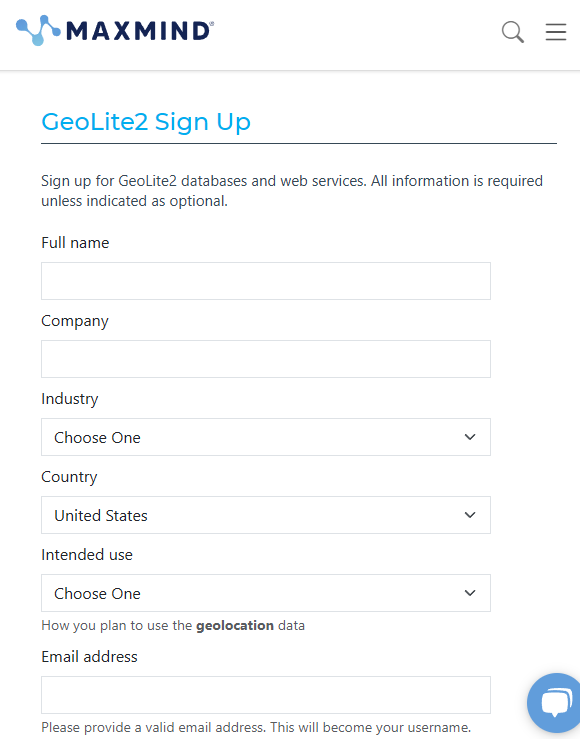
Once you've signed up, MaxMind will send you an email allowing you to set your password.
Then you'll be able to login to your account.
Your username will be the email address you signed up with, and your password will be the password you just set.
You'll then be emailed a code to the email address you signed up with. Enter the code correctly and you'll be greeted with a screen similar to this.
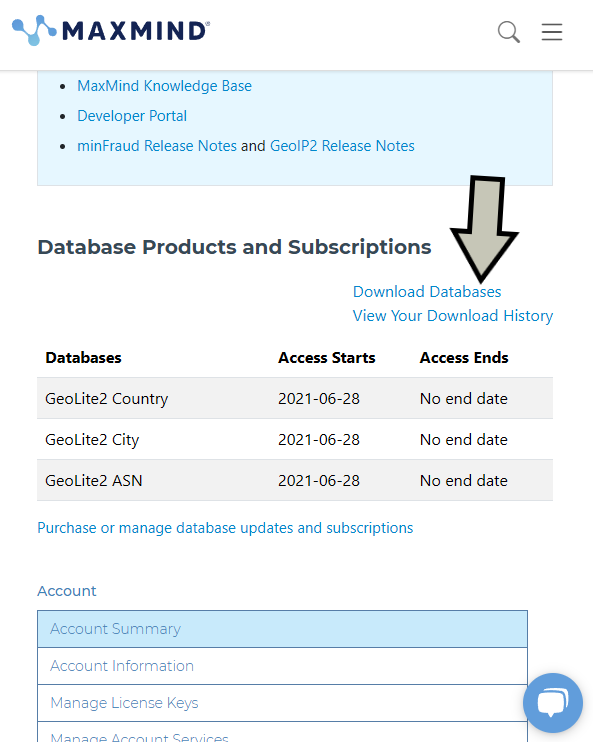
Click on the Download Databases link and you'll be greeted with a number of databases that you can download.
We are going to download the GeoLite2 Country database in mmdb format, so download the GZIP for it.
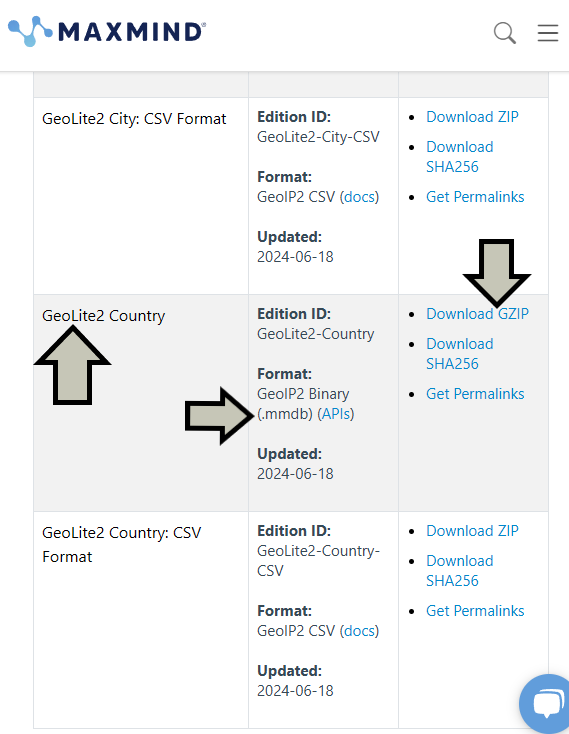
This will download a .tar.gz file. If you are unable to open these files, you can install WinRAR onto your machine.
Go into the folder and extract the GeoLite2-Country.mmdb file into your Web API project in a new folder called Databases.
Once added, you'll need to go into Visual Studio, go into the Databases folder, click on GeoLite2-Country.mmdb and go to Properties.
Ensure that the Build Action is set to Content and the Copy to Output Directory is set to Copy if newer.
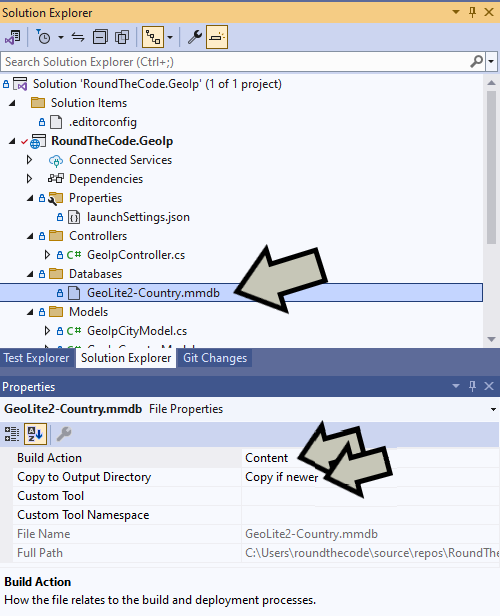
You now have the lookup database added to your ASP.NET Core Web API project.
Add the NuGet package
Before you can start using it, you need to add the MaxMind.GeoIP2 NuGet package. This will allow you to do the IP lookup using the GeoLite2 database.
Add the IP address lookup
Now that you have the NuGet package, you can read the GeoLite2 database and this is something we'll add to the GeoIpService class when it's initalised.
MaxMind recommends that you reuse the DatabaseReader object rather than creating a new one for each lookup as creating a new object is relative expensive on resources. This is the reason why the GeoIpService class is using a singleton instance as it will keep an instance of the DatabaseReader object for the lifetime of the application.
You'll need to locate the path of your database. You can do that by calling Path.GetDirectoryName(Assembly.GetExecutingAssembly().Location) to get the folder of where your ASP.NET Core Web API is being executed. Then simply append the location of your database to it.
As the DatabaseReader object is disposable, we can dispose of it when the GeoIpService class is also disposed.
// GeoIpService.cs
public class GeoIpService : IGeoIpService, IDisposable
{
    private readonly DatabaseReader _countryDatabaseReader;
    const string IP_ADDRESS_REGEX = "^(?:1)?(?:\\d{1,2}|2(?:[0-4]\\d|5[0-5]))\\.(?:1)?(?:\\d{1,2}|2(?:[0-4]\\d|5[0-5]))\\.(?:1)?(?:\\d{1,2}|2(?:[0-4]\\d|5[0-5]))\\.(?:1)?(?:\\d{1,2}|2(?:[0-4]\\d|5[0-5]))$";

    public GeoIpService()
    {
        _countryDatabaseReader = new DatabaseReader(Path.Combine(Path.GetDirectoryName(Assembly.GetExecutingAssembly().Location), "Databases/GeoLite2-Country.mmdb"));
    }

    public GeoIpCountryModel? GetCountry(string? ipAddress)
    {
        // Don't check if there is no IP address.
        if (!IsValidIpAddress(ipAddress))
        {
            return null;
        }

        // Get country information from database.
        return null;
    }

    private bool IsValidIpAddress(string? ipAddress)
    {
        // Don't check if there is no IP address.
        if (string.IsNullOrWhiteSpace(ipAddress))
        {
            return false;
        }

        // Check format of IP address
        if (!Regex.IsMatch(ipAddress, IP_ADDRESS_REGEX))
        {
            return false;
        }

        return true;
    }

    public void Dispose()
    {
        _countryDatabaseReader.Dispose();
    }
}
To get the country based on an IP address, we can call the Country method in the DatabaseReader object, passing in the IP address as the parameter.
If the address can't be found, it will throw a AddressNotFoundException. We'll need to catch that, and return null if that's the case.
We can then return the country in the GeoIpCountryModel class that we set up earlier. The properties we are going to return are:
IpAddress- The IP address that we are looking up.CountryIsoCode- The two letter ISO code for the country e.g. for the United States this would beUS.CountryName- The name of the country (in English).CountryNames- The names of the country in multiple languages, such as French and Spanish.
// GeoIpService.cs
public class GeoIpService : IGeoIpService, IDisposable
{
    private readonly DatabaseReader _countryDatabaseReader;
    const string IP_ADDRESS_REGEX = "^(?:1)?(?:\\d{1,2}|2(?:[0-4]\\d|5[0-5]))\\.(?:1)?(?:\\d{1,2}|2(?:[0-4]\\d|5[0-5]))\\.(?:1)?(?:\\d{1,2}|2(?:[0-4]\\d|5[0-5]))\\.(?:1)?(?:\\d{1,2}|2(?:[0-4]\\d|5[0-5]))$";

    public GeoIpService()
    {
        _countryDatabaseReader = new DatabaseReader(Path.Combine(Path.GetDirectoryName(Assembly.GetExecutingAssembly().Location), "Databases/GeoLite2-Country.mmdb"));
    }

    public GeoIpCountryModel? GetCountry(string? ipAddress)
    {
        // Don't check if there is no IP address.
        if (!IsValidIpAddress(ipAddress))
        {
            return null;
        }

        // Get country information from database.
        CountryResponse countryResponse;
        try
        {
            countryResponse = _countryDatabaseReader.Country(ipAddress);
        }
        catch (AddressNotFoundException)
        {
            return null;
        }

        if (countryResponse?.Country == null)
        {
            return null;
        }

        // Return ISO country code.
        return new GeoIpCountryModel(ipAddress, countryResponse.Country.IsoCode, countryResponse.Country.Name, countryResponse.Country.Names);
    }

    private bool IsValidIpAddress(string? ipAddress)
    {
        // Don't check if there is no IP address.
        if (string.IsNullOrWhiteSpace(ipAddress))
        {
            return false;
        }

        // Check format of IP address
        if (!Regex.IsMatch(ipAddress, IP_ADDRESS_REGEX))
        {
            return false;
        }

        return true;
    }

    public void Dispose()
    {
        _countryDatabaseReader.Dispose();
    }
}
Testing it using a Web API controller
We are going to test this functionality using a Web API controller called GeoIpController.
// GeoIpController.cs
[ApiController]
[Route("[controller]")]
public class GeoIpController : ControllerBase
{
    private readonly IGeoIpService _geoIpService;

    public GeoIpController(IGeoIpService geoIpService)
    {
        _geoIpService = geoIpService;
    }

    [HttpGet("country")]
    public IActionResult GetCurrentCountry()
    {
        return Ok(new { IpAddress = _geoIpService.GetCountry(HttpContext.Connection.RemoteIpAddress?.ToString()) });
    }

    [HttpGet("country/{ipAddress}")]
    public IActionResult GetCountry(string ipAddress)
    {
        return Ok(new { IpAddress = _geoIpService.GetCountry(ipAddress) });
    }
}
We have created two endpoints.
The first one gets the current country based on the IP address of the client. For this to work, you'll need to publish your ASP.NET Core Web API to an external server. Otherwise, it will use just use the IP address of your machine and will return null.
The second one allows us to pass in an IP address as part of the URL. If we were to run /api/geoip/country/6.6.6.6, it returns the following JSON response:
{
  "ipAddress": {
    "ipAddress": "6.6.6.6",
    "countryIsoCode": "US",
    "countryName": "United States",
    "countryNames": {
      "de": "USA",
      "en": "United States",
      "es": "Estados Unidos",
      "fr": "États Unis",
      "ja": "アメリカ",
      "pt-BR": "EUA",
      "ru": "США",
      "zh-CN": "美国"
    }
  }
}
How to get the client's IP address when on a reverse proxy
Using HttpContext.Connection.RemoteIpAddress?.ToString() works fine if you are using a standalone server.
However, if you are using a reverse proxy like Cloudflare, you'll find that the IP address returned is the IP address of the proxy. Not the IP address of your client.
Reverse proxies will often add an addition request header called X-Forwarded-For. This usually contains the IP address of the client.
In ASP.NET Core, there is ForwardedHeaders middleware that you can use to override the value of HttpContext.Connection.RemoteIpAddress.
This can be added to Program.cs.
// Program.cs
var builder = WebApplication.CreateBuilder(args);

...

// Add forwarded headers middleware
builder.Services.Configure<ForwardedHeadersOptions>(options =>
{
    options.ForwardedHeaders =
        ForwardedHeaders.XForwardedFor | ForwardedHeaders.XForwardedProto;
});

var app = builder.Build();

...

// Use forwarded headers middleware
app.UseForwardedHeaders();

...
app.Run();
This can be tested in Postman by adding a X-Forwarded-For header to the request and seeing the response.
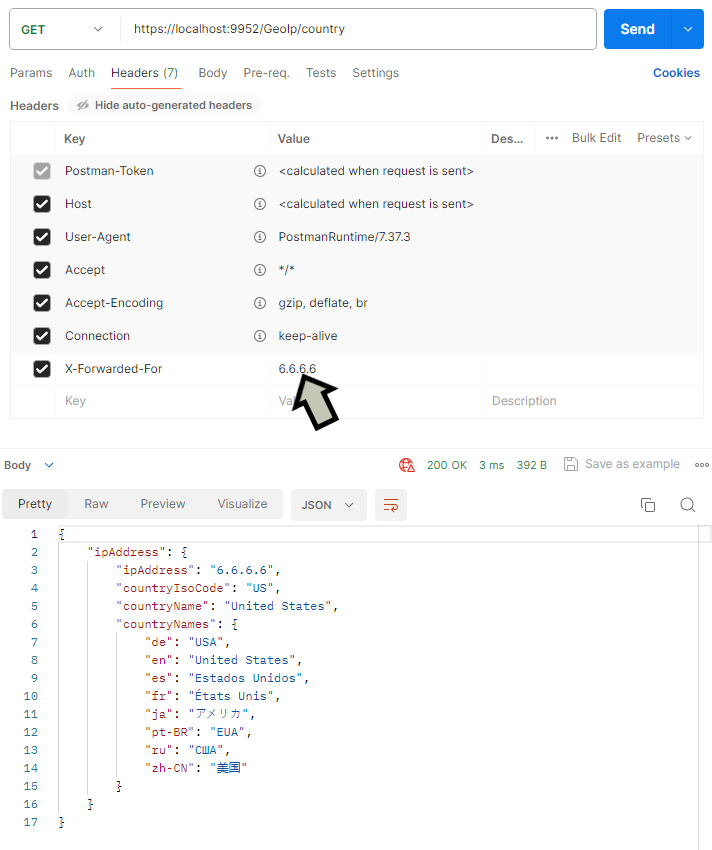
Adding a custom header for the IP address
You may find that your reverse proxy adds its own request header for the client's IP address.
For example, Cloudflare will add CF-Connecting-IP as a request header that is used as the IP address of the original request.
You can modify the ForwardedHeaders middleware to add the header name by using the ForwardedForHeaderName property in ForwardedHeadersOptions.
// Program.cs
var builder = WebApplication.CreateBuilder(args);

...

// Add forwarded headers middleware
builder.Services.Configure<ForwardedHeadersOptions>(options =>
{
    options.ForwardedHeaders = ForwardedHeaders.XForwardedFor | ForwardedHeaders.XForwardedProto;
    options.ForwardedForHeaderName = "CF-Connecting-IP";
});

var app = builder.Build();

...

// Use forwarded headers middleware
app.UseForwardedHeaders();

...

app.Run();
By adding CF-Connecting-IP to the request header, it now returns the country based on that IP address.
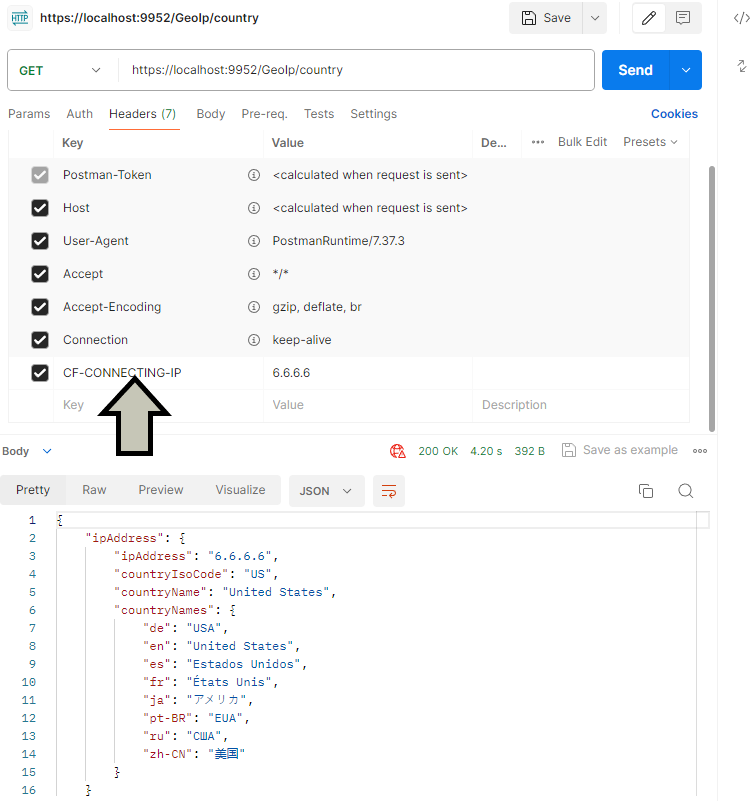
Just an important security note to only use the ForwardedHeaders middleware if you are using a reverse proxy.
Otherwise as we've just demonstrated, it's easy for the client to forge the IP address to where they are located.
Adding the city database
GeoLite2 also comes with a separate city database. Not only does that contain the information about the country, but also about the city.
However, there is a sizeable difference between the two databases. The city database is nearly 8 times bigger than the country database when we downloaded it.
You can find the city database in the same place where the country database is. It's called GeoLite2 City and the format is in mmdb.
When you download and extract it from the zip file into your ASP.NET Core Web API project, make sure that you set the properties for it in Visual Studio.
The Build Action has to be set to Content and the Copy to Output Directory is set to Copy if newer.
We can then modify the GeoIpService class to also include lookup for the city.
We've created a separate reader object for the city database and a new method called GetCity to do an IP address lookup based on the city.
// GeoIpService.cs
public class GeoIpService : IGeoIpService, IDisposable
{
    private readonly DatabaseReader _cityDatabaseReader;
    private readonly DatabaseReader _countryDatabaseReader;
    const string IP_ADDRESS_REGEX = "^(?:1)?(?:\\d{1,2}|2(?:[0-4]\\d|5[0-5]))\\.(?:1)?(?:\\d{1,2}|2(?:[0-4]\\d|5[0-5]))\\.(?:1)?(?:\\d{1,2}|2(?:[0-4]\\d|5[0-5]))\\.(?:1)?(?:\\d{1,2}|2(?:[0-4]\\d|5[0-5]))$";

    public GeoIpService()
    {
        _cityDatabaseReader = new DatabaseReader(Path.Combine(Path.GetDirectoryName(Assembly.GetExecutingAssembly().Location), "Databases/GeoLite2-City.mmdb"));
        _countryDatabaseReader = new DatabaseReader(Path.Combine(Path.GetDirectoryName(Assembly.GetExecutingAssembly().Location), "Databases/GeoLite2-Country.mmdb"));
    }

    public GeoIpCityModel? GetCity(string? ipAddress)
    {
        // Don't check if there is no IP address.
        if (!IsValidIpAddress(ipAddress))
        {
            return null;
        }

        // Get country information from database.
        CityResponse cityResponse;
        try
        {
            cityResponse = _cityDatabaseReader.City(ipAddress);
        }
        catch (AddressNotFoundException)
        {
            return null;
        }

        if (cityResponse?.City == null && cityResponse?.Country == null)
        {
            return null;
        }

        return new GeoIpCityModel(ipAddress, cityResponse?.City?.Name, cityResponse?.Country?.IsoCode, cityResponse?.Country?.Name, cityResponse?.Country?.Names);
    }

    public GeoIpCountryModel? GetCountry(string? ipAddress)
    {
        // Don't check if there is no IP address.
        if (!IsValidIpAddress(ipAddress))
        {
            return null;
        }

        // Get country information from database.
        CountryResponse countryResponse;
        try
        {
            countryResponse = _countryDatabaseReader.Country(ipAddress);
        }
        catch (AddressNotFoundException)
        {
            return null;
        }

        if (countryResponse?.Country == null)
        {
            return null;
        }

        // Return ISO country code.
        return new GeoIpCountryModel(ipAddress, countryResponse.Country.IsoCode, countryResponse.Country.Name, countryResponse.Country.Names);
    }

    private bool IsValidIpAddress(string? ipAddress)
    {
        // Don't check if there is no IP address.
        if (string.IsNullOrWhiteSpace(ipAddress))
        {
            return false;
        }

        // Check format of IP address
        if (!Regex.IsMatch(ipAddress, IP_ADDRESS_REGEX))
        {
            return false;
        }

        return true;
    }

    public void Dispose()
    {
        _cityDatabaseReader.Dispose();
        _countryDatabaseReader.Dispose();
    }
}
We can also modify the GeoIpController to test out the methods.
// GeoIpController.cs
[ApiController]
[Route("[controller]")]
public class GeoIpController : ControllerBase
{
    private readonly IGeoIpService _geoIpService;

    public GeoIpController(IGeoIpService geoIpService)
    {
        _geoIpService = geoIpService;
    }

    [HttpGet("city")]
    public IActionResult GetCurrentCity()
    {
        return Ok(new { IpAddress = _geoIpService.GetCity(HttpContext.Connection.RemoteIpAddress?.ToString()) });
    }

    [HttpGet("city/{ipAddress}")]
    public IActionResult GetCity(string ipAddress)
    {
        return Ok(new { IpAddress = _geoIpService.GetCity(ipAddress) });
    }

    [HttpGet("country")]
    public IActionResult GetCurrentCountry()
    {
        return Ok(new { IpAddress = _geoIpService.GetCountry(HttpContext.Connection.RemoteIpAddress?.ToString()) });
    }

    [HttpGet("country/{ipAddress}")]
    public IActionResult GetCountry(string ipAddress)
    {
        return Ok(new { IpAddress = _geoIpService.GetCountry(ipAddress) });
    }
}
Just a note that the City information in GeoLite2 isn't that accurate. When we tried it against our IP address, it thought we were based in a location around 120 miles (193 km) away from where we really are.
You can see us use the city database as well as everything else we have covered in this tutorial by watching this video.
Latest tutorials

