
EF Core transactions: Stop your data getting out of sync

Your Entity Framework Core data might already be out of sync, and you wouldn't even know it.
The problem
The problem occurs when you have multiple SaveChangesAsync calls.
In this example, we add an order to a dispatch queue, save it to the database, then use the generated dispatch queue ID to send an email. Afterwards, we mark the order as paid and update the database.
var dispatchQueue = new DispatchQueue
{
	OrderId = order.Id,
	CreatedDate = DateTime.UtcNow
};

await _context.DispatchQueue.AddAsync(dispatchQueue);
await _context.SaveChangesAsync();

await _emailClient.SendOrderDispatchEmail(dispatchQueue.Id);

order.PaidDate = DateTime.UtcNow;
await _context.SaveChangesAsync();
If the second SaveChangesAsync call throws an exception, the order is not marked as paid even though it has been added to the dispatch queue and the email has been sent.
The data would be out of sync.
We could mark the order as paid before adding it to the dispatch queue. But you still have the same problem if the second SaveChangesAsync call fails.
Introducing transactions
A better option is to add these calls into a transaction.
Transactions allow several database operations to be processed as a single unit.
However, if an exception is thrown, the transaction is rolled back, or you forget to commit the transaction, none of the operations are applied to the database.
It's only if the transaction is committed that all the operations are applied to the database.
You create a transaction from your DbContext by calling the BeginTransactionAsync method from the Database property. To commit a transaction, you call CommitAsync from the IDbContextTransaction instance.
public async Task<bool> MarkAsPaidAsync(int id)
{
	await using var transaction = await _context.Database.BeginTransactionAsync();

	...

	order.PaidDate = DateTime.UtcNow;
	await _context.SaveChangesAsync();

	await transaction.CommitAsync();

	return true;
}
It is essential that you call CommitAsync. If you don't, none of the database operations will be applied to the database.
Using Entity Framework Core in a Web API
Transactions are one of the reasons that make Entity Framework Core the major ORM used in ASP.NET Core.
Because it is so popular, we used it in our Minimal APIs for complete beginners course, and you can use it too to build a Web API from start to finish.
This is essential if you are new to Entity Framework Core and want to get hands-on experience.
Rolling back transactions
Going back to transactions, here we are rolling back a transaction if the email fails to send:
await using var transaction = await _context.Database.BeginTransactionAsync();

…

var dispatchQueue = new DispatchQueue
{
	OrderId = order.Id,
	CreatedDate = DateTime.UtcNow
};

await _context.DispatchQueue.AddAsync(dispatchQueue);
await _context.SaveChangesAsync(); // Does not save changes if email fails to send

if (!await _emailClient.SendOrderDispatchEmail(dispatchQueue.Id))
{
	await transaction.RollbackAsync(); // Transaction rolled back
	return false;
}
If a transaction is rolled back, none of the operations are run, even if SaveChangesAsync has already been called.
Isolation levels
You can set isolation levels in transactions, but be careful as certain levels can cause blocking.
These define how one transaction is isolated from changes made by other transactions.
Serializable
This is the highest level and has complete isolation from other transactions. It prevents any new rows from being added that match any queries inside your transaction.
In this example, we are querying the orders where PaidDate does not have a value. If we try to insert a new order where the PaidDate is null, it would hang until this transaction is complete.
using var transaction = await _context.Database
	.BeginTransactionAsync(IsolationLevel.Serializable);

var orders = await _context.Orders.Where(x => !x.PaidDate.HasValue).ToListAsync();
var order = orders.SingleOrDefault(x => x.Id == id);

...

await transaction.CommitAsync(); // Completes the transaction
Snapshot
This is like serializable but without the blocking issues. With this, if you try to update two records at the same time, the first one will succeed but the other will fail.
You also need to allow snapshot isolation on your database; otherwise, it will not work.
ALTER DATABASE [DATABASE] SET ALLOW_SNAPSHOT_ISOLATION ONTo use snapshot, you add IsolationLevel.Snapshot.
using var transaction = await _context.Database
	.BeginTransactionAsync(IsolationLevel.Snapshot);
If a record fails to update, you get this exception:
SqlException: Snapshot isolation transaction aborted due to update conflict.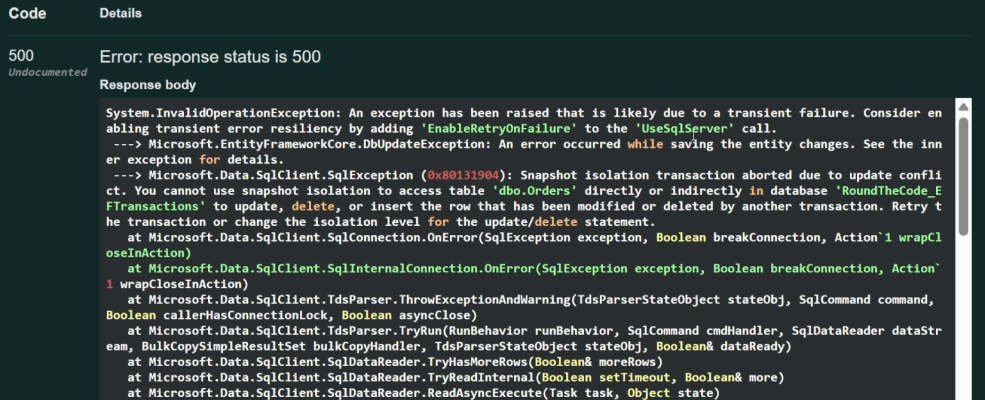
Repeatable read
If a transaction reads a row, it cannot be changed until other transactions complete. This can cause performance issues if you are trying to update the same record at the same time. However, it does not prevent new rows from being inserted.
To use repeatable read you add IsolationLevel.RepeatableRead.
using var transaction = await _context.Database
	.BeginTransactionAsync(IsolationLevel.RepeatableRead);
Read uncommitted
This is the lowest isolation level and can read other transactions that have not been committed. The problem is that the transaction may not be committed, meaning it will read data that might never actually be saved to the database.
To use read uncommitted, add IsolationLevel.ReadUncommitted:
using var transaction = await _context.Database
	.BeginTransactionAsync(IsolationLevel.ReadUncommitted);
Read committed
This isolation level only allows you to read transactions that have been committed to the database. This is the default for SQL Server.
To use read committed, add IsolationLevel.ReadCommitted.
using var transaction = await _context.Database
	.BeginTransactionAsync(IsolationLevel.ReadCommitted);
You may not need transactions
Before you go ahead and change all your queries to use transactions, you may not need them.
When you call SaveChangesAsync, any added, modified, or deleted entities in the DbContext will be executed in a single transaction.
Therefore, they either all get run, or none of them get run if an exception is thrown.
In this example, the order is added to the dispatch queue and marked as paid in a single SaveChangesAsync call:
var dispatchQueue = new DispatchQueue
{
	OrderId = order.Id,
	CreatedDate = DateTime.UtcNow
};

await _context.DispatchQueue.AddAsync(dispatchQueue);
order.PaidDate = DateTime.UtcNow;

// Adds the order to the dispatch queue
// and marks the order as paid in a single call
await _context.SaveChangesAsync();
Watch the video
Watch this video where we talk through the problem of how data can get out of sync, how transactions work, and how behaviour changes through different isolation levels.
Related pages
