
Adding .NET features takes ages, so we tried Claude Code

You have a new .NET feature to add. You know it will take ages. Let's see if Claude Code can speed it up for you.
The experiment
We had a project with several controllers. The task was to migrate all of them to Minimal APIs. If you have done this manually before, you will know exactly how tedious it is. You need to go through every endpoint in every controller, copy the logic across, restructure the routing, and if you have unit tests, those need updating too. All very time-consuming.
We opened Claude Code inside the project and gave it the following prompt:
Migrate controllers with Minimal API endpoints and update any unit tests
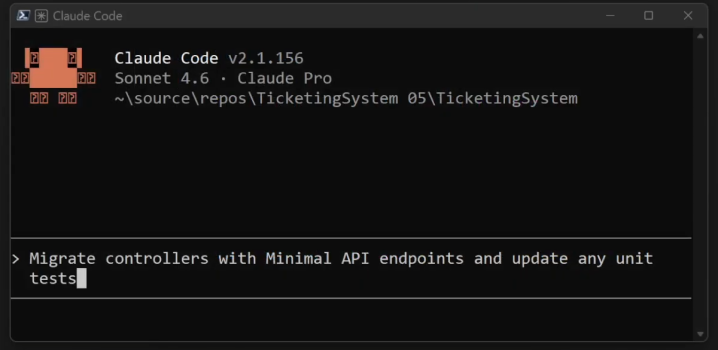
Let's see how much quicker it is.
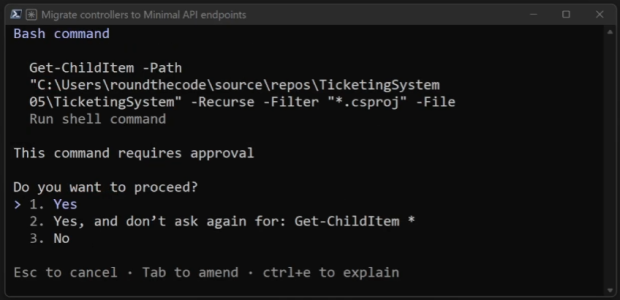
Claude asks for permission first
One of the first things you will notice is that Claude will not just go ahead and change your code. It asks for permission before modifying anything. This means you stay in full control of what gets changed and what does not.
The result
The migration worked. It had removed the controllers and replaced them with Minimal APIs. However, it took nearly 15 minutes. Claude had to scan the files and make assumptions about how the project was structured. Those assumptions were not necessarily wrong, but they were not how we would have written the code ourselves.
For example, in Program.cs, it added three extension methods. Inside one of them, it mapped all the routes for a group. The handlers were placed into separate methods. The structure was reasonable, but it was Claude's interpretation of the project, not ours. There was no CLAUDE.md file at this point, so Claude had no choice but to infer everything from scratch.
What is a CLAUDE.md file?
A CLAUDE.md file sits in the root of your project and tells Claude everything it needs to know about how your project is structured. Things like the patterns you use, the conventions you follow, and how you want the code written. Once it exists, Claude reads it before making any changes.
To generate one, you run this prompt in Claude Code:
/init
Claude will then scan your project files and build up an understanding of the codebase, before writing the file for you. Again, it will ask for permission at each step, and all those settings are stored in a .claude folder that you can edit at any time.
The generated CLAUDE.md covers everything Claude needs to know about the project. And importantly, you can add to it or change it yourself. If there are conventions Claude has missed, or ways you want the code structured, you can specify them directly.
Running the same experiment again
We added some instructions to the CLAUDE.md file describing exactly how we wanted Minimal APIs structured. Then we ran the same migration prompt again.
This time, the migration completed in 8 minutes, which was nearly half the time. Claude no longer had to scan and guess. It already knew the project.
The structure it produced also followed our conventions more closely. It added extension methods for each group in Program.cs and used lambda statements for the handlers, which is closer to what we had described. Not perfect, but noticeably better.
Iterating with CLAUDE.md
We wanted each endpoint handler in a separate method rather than an inline lambda, so we added a line to the CLAUDE.md file to specify this and ran a prompt to make that change.
The result was not quite right on the first attempt. Everything ended up on one line. So, we updated the CLAUDE.md file again with a more detailed example of how we wanted an endpoint to look.
After that, each handler was using TypedResults correctly and structured the way we wanted. Still not perfect, but much closer. The key takeaway here is this: the more detail you give Claude, the better the output. The CLAUDE.md file is where that detail lives, and it pays to invest time in it.
Setting up Claude Code
Getting started with Claude Code is straightforward. There is a single install script that works on Windows, Mac, and Linux.
On Windows, you can use either PowerShell or CMD. It should not make a meaningful difference as to which one you use. After installing, if you see an error about a missing path, you will need to add the install folder to your user path in environment variables, then restart the terminal.
Once that is done, change directory to your project folder and type claude to launch it. You will be walked through some initial settings and asked to log in with your account. You can also use API usage billing if you prefer.
How much does it cost?
This is the question everyone asks first, and understandably so. Claude provides a pricing page with details on how much it will cost. Everyone will need at least a Pro account as a starting point.
Pro - a good starting point for an individual developer who has not used Claude before.
Max - if you find yourself hitting Pro limits regularly, this is the next step up.
Team / Enterprise - for organisations with multiple developers using Claude Code.
Bring Claude Code into your IDE
Using Claude Code in the console works fine, but switching between a terminal and your editor all day is not ideal. Fortunately, there are IDE integrations available.
At the time this article was published, Visual Studio does not have an official Claude Code extension, but there is a well-regarded unofficial one. To install it, go into Visual Studio and go to Extensions > Manage Extensions, search for Claude Code, and install it. After restarting Visual Studio, you will find it under View > Other Windows. You enter your prompt at the top and use it just like the console.
If you use Visual Studio Code, there is an official Claude Code extension available. Once installed, it runs alongside your project in a dedicated panel, making it much easier to stay in flow while working.
Watch the video
Watch this video where we walk through all of this, including the full migration experiment and a closer look at how the CLAUDE.md file was set up.
Related pages

