
.NET app returning a blank 500? Not with exception handlers

Does your ASP.NET Core Web API return a blank 500 response? That's a sign that you're handling exceptions wrong.
Here's how to fix it properly.
Implementing an exception handler
The correct way to handle exceptions globally is to implement the IExceptionHandler interface and its TryHandleAsync method. This is where your exception handling logic lives.
// DefaultExceptionHandler.cs
public class DefaultExceptionHandler : IExceptionHandler
{
	public async ValueTask<bool> TryHandleAsync(
		HttpContext httpContext,
		Exception exception,
		CancellationToken cancellationToken)
	{
		httpContext.Response.StatusCode = StatusCodes.Status500InternalServerError;

		await httpContext.Response.WriteAsJsonAsync(new
		{
			StatusCode = httpContext.Response.StatusCode,
			Message = exception.Message,
			Type = exception.GetType().Name
		}, cancellationToken);

		return true;
	}
}
Notice that TryHandleAsync returns a bool. This is the important part. Return true and the exception handling pipeline stops at this handler. Return false and it passes the exception on to the next exception handler in the chain.
Registering the exception handler
Once you've created your handler, you need to wire it up in Program.cs. There are three lines to add, and forgetting any one of them will cause problems.
// Program.cs
builder.Services.AddExceptionHandler<DefaultExceptionHandler>();
builder.Services.AddProblemDetails();
Don't forget AddProblemDetails. If you leave this out, your application will throw an exception before it even starts running.
You also need to add the middleware call after the app is built:
// Program.cs
app.UseExceptionHandler();
Forget UseExceptionHandler and none of your exception handlers will ever run. It's easy to miss and you could spend a long time wondering why nothing is working.
Logging the exception
Returning the right status code is only half the job. You also need to log the exception, otherwise you'll have no way to debug what went wrong. Inject ILogger into your handler and call LogError inside TryHandleAsync:
// DefaultExceptionHandler.cs

public class DefaultExceptionHandler : IExceptionHandler
{
	private readonly ILogger<DefaultExceptionHandler> _logger;

	public DefaultExceptionHandler(ILogger<DefaultExceptionHandler> logger)
	{
		_logger = logger;
	}

	public async ValueTask<bool> TryHandleAsync(
		HttpContext httpContext,
		Exception exception,
		CancellationToken cancellationToken)
	{
		_logger.LogError(exception, exception.Message);

		httpContext.Response.StatusCode = StatusCodes.Status500InternalServerError;

		await httpContext.Response.WriteAsJsonAsync(new
		{
			StatusCode = httpContext.Response.StatusCode,
			Message = exception.Message,
			Type = exception.GetType().Name
		}, cancellationToken);

		return true;
	}
}
With this in place, you'll see full exception details including the stack trace in the console window when running locally.
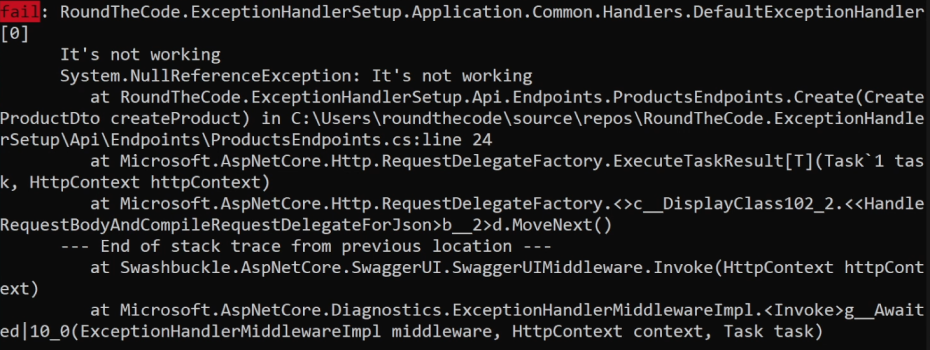
Without it, you'll have no idea who, what, or when caused the exception.
What happens without exception handling?
Without an exception handler registered, your API behaves differently depending on the environment.
In development, ASP.NET Core returns full exception details including the stack trace and header information. Useful for debugging, but you don't want this leaking out to consumers.
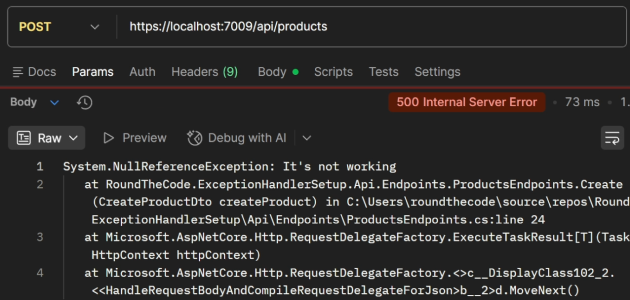
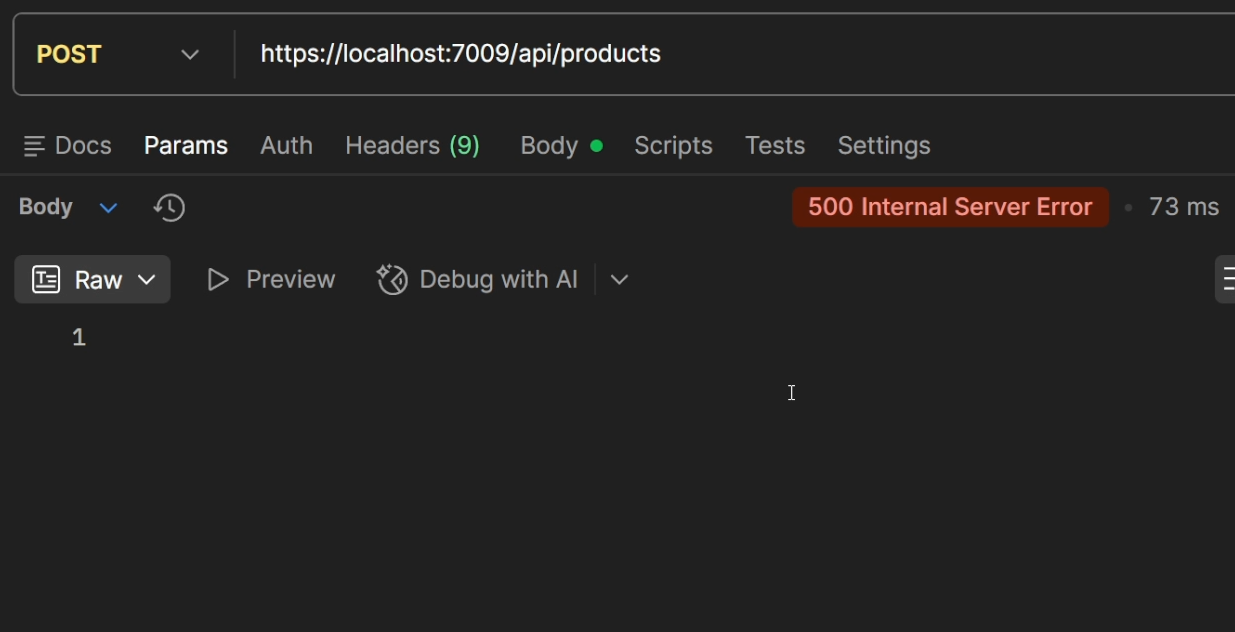
In production, you get absolutely nothing - a zero-byte response. That's good from a security standpoint because you're not exposing internal details to the world. However, it's unhelpful to clients using your API, since it tells them nothing about what went wrong with their request.
Handling specific exception types
The default handler catches everything, but sometimes you need to handle a specific exception type differently. A common example is with FluentValidation. By default, a failed validation throws a ValidationException if you call ValidateAndThrowAsync. In this scenario, it would get caught by the default handler and would return a 500. But validation failures should return a 400 Bad Request.
To solve this, create a separate exception handler:
// ValidationExceptionHandler.cs
public class ValidationExceptionHandler : IExceptionHandler
{
	private readonly ILogger<ValidationExceptionHandler> _logger;

	public ValidationExceptionHandler(ILogger<ValidationExceptionHandler> logger)
	{
		_logger = logger;
	}

	public async ValueTask<bool> TryHandleAsync(
		HttpContext httpContext,
		Exception exception,
		CancellationToken cancellationToken)
	{
		if (exception is not ValidationException validationException)
		{
			return false;
		}

		_logger.LogError(exception, exception.Message);

		httpContext.Response.StatusCode = StatusCodes.Status400BadRequest;

		var errors = validationException.Errors
			.Select(e => new { e.PropertyName, e.ErrorMessage });

		await httpContext.Response.WriteAsJsonAsync(new
		{
			StatusCode = httpContext.Response.StatusCode,
			Errors = errors
		}, cancellationToken);

		return true;
	}
}
The key is the type check at the top. If the exception is not a ValidationException, we return false and it passes on to the next handler in the pipeline. Otherwise we change the status code to 400, output the validation errors, and return true.
Registration order matters
This is a common issue. The order in which you register exception handlers in Program.cs determines the order in which they run. Register the specific handler before the default one:
// Program.cs
builder.Services.AddExceptionHandler<ValidationExceptionHandler>();
builder.Services.AddExceptionHandler<DefaultExceptionHandler>();
builder.Services.AddProblemDetails();
If you register DefaultExceptionHandler first, it will catch the ValidationException before ValidationExceptionHandler even gets a look-in, and you'll get a 500.
Mapping status codes by exception type
You can take this further with a handler that maps different exception types to different status codes using a dictionary:
// ApiExceptionHandler.cs
public class ApiExceptionHandler : IExceptionHandler
{
	private Dictionary<Type, int> ExceptionStatusCodes = new()
	{
		{ typeof(UnauthorizedAccessException), StatusCodes.Status401Unauthorized },
		{ typeof(TaskCanceledException), StatusCodes.Status499ClientClosedRequest }
	};

	public async ValueTask<bool> TryHandleAsync(HttpContext httpContext, Exception exception, CancellationToken cancellationToken)
	{
		if (!ExceptionStatusCodes.TryGetValue(exception.GetType(), out int statusCode))
		{
			return false;
		}

		httpContext.Response.StatusCode = statusCode;

		await httpContext.Response.WriteAsJsonAsync(new ValidationProblemDetails()
		{
			Title = "An exception was thrown",
			Status = httpContext.Response.StatusCode
		}, cancellationToken);

		return true;
	}
}
If the exception type is not in the dictionary, it returns false and moves on. Register this handler before DefaultExceptionHandler so it doesn't return a 500:
// Program.cs
builder.Services.AddExceptionHandler<ValidationExceptionHandler>();
builder.Services.AddExceptionHandler<ApiExceptionHandler>();
builder.Services.AddExceptionHandler<DefaultExceptionHandler>();
builder.Services.AddProblemDetails();
Why not just use middleware?
Before .NET 8, using middleware with a try/catch block was the standard way to handle exceptions globally. You'll still see it in many codebases:
// ExceptionHandlingMiddleware.cs
public class ExceptionHandlingMiddleware(RequestDelegate next)
{
	public async Task InvokeAsync(HttpContext context)
	{
		try
		{
			await next(context);
		}
		catch (Exception ex)
		{
			await HandleExceptionAsync(context, ex);
		}
	}

	private async Task HandleExceptionAsync(
		HttpContext httpContext,
		Exception exception)
	{
		httpContext.Response.ContentType = "application/json";
		httpContext.Response.StatusCode = exception switch
		{
			ValidationException => StatusCodes.Status400BadRequest,
			UnauthorizedAccessException => StatusCodes.Status401Unauthorized,
			TaskCanceledException => StatusCodes.Status499ClientClosedRequest,
			_ => StatusCodes.Status500InternalServerError
		};

		await httpContext.Response.WriteAsJsonAsync(new ValidationProblemDetails()
		{
			Title = exception.Message,
			Status = httpContext.Response.StatusCode,
		});
	}
}
There are several reasons to prefer exception handlers over this approach.
Separation of concerns. Each exception handler lives in its own class. That makes them easier to reason about, easier to test, and easier to add or remove independently. The middleware approach tends to grow into one large switch statement.
Control over execution order. With exception handlers, you control the order by the order you register them. With middleware, everything is bundled together.
It's the recommended approach. Exception handlers are the ASP.NET Core native approach from .NET 8 onwards. If you're on .NET 8 or later, there's no reason to reach for middleware-based exception handling.
If you do need to use middleware for any reason, make sure it's registered after the app is built so it can catch exceptions further down the pipeline.
Watch the video
Watch the video where we show you how to add exception handlers into your .NET app and demonstrate what happens when you don't add them.
Related tutorials
